
PCWin Software Download Center
 
Product Home
Download Trial
Purchase
Author Site

Category

 
Audio
All-in-One Jukeboxes
Audio Players
CD Players
Featured Tracks
MIDI Applications
MP3 Search Tools
Music Creation
Music Management
Rippers & Encoders
Streaming Audio
Utilities & Plug-Ins
Business & Finance
Desktop Enhancements
DVD & Video
Games
Home & Education
Internet
Multimedia & Design
Security & Privacy
Software Development
Utilities
Web Authoring


Popular Downloads

 
Internet Download Manager
TubeHunter Ultra
EasySystemCleaner
Majestic Waterfalls Screensaver
Visual Renamer
Aurora Web Editor 2007 Professional
MySpeed PC Lite
eScan Pro Edition
HelpVistaXPDiamond
Win Guard Pro
 

New Downloads

 
Xilisoft Video Converter Ultimate
TextEncrypt
Uninstall Tool
4Media DVD to iPhone Suite for Mac
DriveSentry
Dynamic Info Screen
Actual Window Minimizer
MSG Viewer Pro
Talking Dictionary
TrustPort PC Security
 

Related Downloads

 
Real Audio Converter
Real Audio To Mp3
Real Audio
Real Audio Burn
Real Audio Cd Burner
Real Audio Record
Real Audio Files
Real Audio Meta File
Mac Audio Converter
Mp3 Audio Converter
 

Total Audio Converter Screenshot
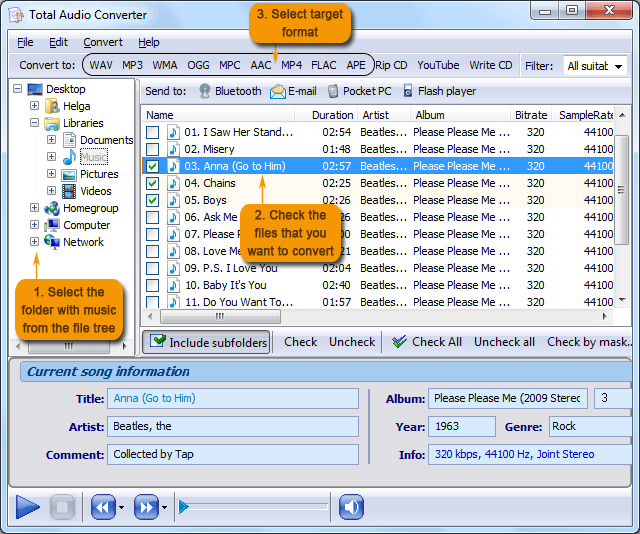
Ask yourself what is a perfect audio converter for you? Supporting all audio formats? To be handled via command line? The one with built-in audio player and CD ripper? And sure easy-to-use? We have just the one you can dream of - Total Audio Converter. You have 8 reasons to choose Total Audio Converter (no ad, just facts):

1. Batch conversion
Either you have one file or a hundred of them it will take you seconds to set the conversion process.

2. All audio formats
Total Audio Converter supports more than 30 audio formats as source formats! The target formats are WAV, MP3, OGG, WMA, APE, FLAC, MP4, AAC, MPC. It's mot an mp3 converter or ogg convert, it's all formats converter.

3. Command line
Command line is a great thing to run your converter from within other programs. All command line parameters are described so even a beginner will master them in no time.

4. Rip CD
This option allows you to rip audio tracks from CD's and convert them to another format at the same time. Quite time saving!

5. Windows integration
Total Audio Converter integrates into Windows popup menu. Just select the file on your desktop and make a right mouse click.

6. Built-in audio player
Total Audio Converter has built-in audio player. Now you can play your song before or after the conversion. Sometimes it's the best way to find the difference between formats.

7. No tech knowledge required
Inituative interface makes it easy for everybody to be the master of audio conversions. If you do not know what bitrate or frequency to choose Wizard will automatically set the most appropriate.

8. Quality
Total Audio Converter is a high quality product. Those who ever tried any other tool from CoolUtils know that. You can try it out for 30 days for free to believe that. Just hit Download button and get Total Audio Converter for free with no obligations. Make your own opinion about the tool.


Back to Total Audio Converter Details page

Total Audio Converter Screenshot Related

Acc Audio Cd Cda
Converter Mp3 Mp4 Ogg
Ra Real Audio Rip Software
Utility Wav Wma
 

Copyright © 1995-2008 PCWin Download Center. Home | | Privacy | Link to Us | Submit / Update Software