
Scotts Windows Startup Program Manager Screenshot
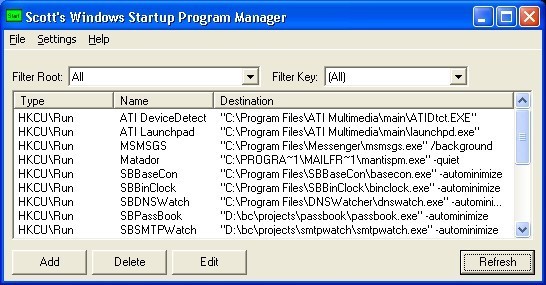
Scott's Windows Startup Program manager is a utility designed to let you manage the programs that automatically start when your Windows PC boots up. These programs are generally stored in the windows registry, and are difficult to edit, unless you are familiar with how the windows registry works. This software is designed to be a much easier interface to let you add, remove, and edit items from the startup list. This program is free for non-commercial use, and has no expirations, time limits, disabled features, adware, spyware, or any other junk that will keep you from using it. So why do you need to edit the windows startup programs? Well, there are several reasons. The first is that some program you installed put something annoying in there that you don't want. For example, maybe your digital camera installs a "helpful tool" that automatically pops up every time you boot and asks you if you want to update your software to the latest version. A second situation is that maybe you've been the victim of an adware or spyware attack. The adware programs often place themselves in the windows startup settings so that their adware program gets loaded each time. So you go in, find something that doesn't belong, and nuke it. Finally, there's one other situation I can think of where you might find this software useful -- let's say you actually *want* something loaded at startup (maybe a tool you find useful...), then you can use this software to add the thing you want to the list. You *could* do all of this with a registry editor like regedit, but using this tool is so much easier! ... and it's *free*
Back to Scotts Windows Startup Program Manager Details page
- Scott S Windows Startup Program Manager
- Startup Manager Program
- Startup Program Manager
- Windows Xp Startup Manager
- Windows Startup Manager Xp
- Startup Manager Windows
- Startup Manager For Windows
- Startup Manager Windows Mobile
- Windows Mobile Startup Manager
- Windows Xp Startup Display Manager


