
PowerPointPipe Search and Replace Screenshot
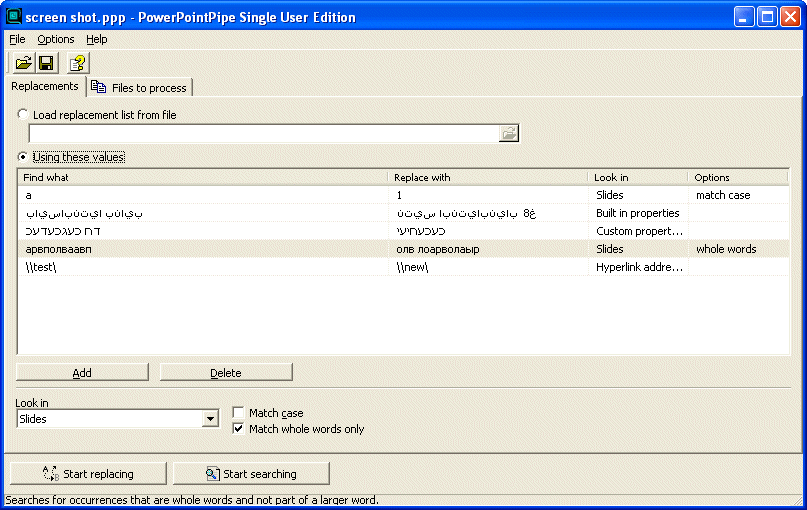
PowerPointPipe is used by IT personnel to change hyperlinks when a server gets renamed, by SMEs and large organizations when they change their contact details/name/etc, by translators to apply massive search/replace lists - the list of uses is endless.
PowerPointPipe can change thousands or millions of documents, and can even make multiple changes simultaneously to save time. It can be automated to run overnight or over a weekend, and it takes care of passwords, protection, locked fields, read-only files and other messy details.
To use PowerPointPipe, you simply add a list of search/replace pairs, and for each one, specify where in the document it should be found. Then you tell it which files to process - that's it!
PowerPointPipe offers many more search and replace options than Microsoft PowerPoint; such as hyperlinks, bookmark names, text boxes, shapes, drop down fields, document properties (such as Title, Subject, Author, Company etc) and more.
Unlike competing products, PowerPointPipe is fully Unicode compliant (allowing search and replace with international character sets), and can handle an unlimited number of both documents and search/replace pairs.
Try it today - and see why Microsoft recommends PowerPointPipe to its customers!
Features:
New! Find and replace inside the Slide Master (per Slide), Master Slide (per presentation), Notes Master, Title Master and Handout Master
New! Search and replace inside OLE Link paths e.g. to embedded Excel worksheets
Search and replace inside slide notes
Search and replace with all PowerPoint's options such as Match Case, Match Whole Word etc, plus more
Handles any number of sub folders
Search and replace inside hyperlink addresses
Search and replace inside shapes
Search and replace inside built in document properties and custom properties such as Title, Subject, Author, Company etc
Search and replace inside headers and footers
Fully Unicode compliant - search and replace international character sets (unlike competing products)
Allows replacements to be longer than 255 characters (Microsoft PowerPoint limits this to 255)
Works with Windows SharePoint Services document libraries
Control the presentation types used - so you can process any custom presentation type
Can be automated via the command line
Easy to install/uninstall
The original file date and time stamp can be preserved.
Back to PowerPointPipe Search and Replace Details page
- Powerpointpipe Lite For Twodownload
- Search And Replace All
- Search And Replace And
- RQ Search And Replace
- Html Search Replace
- Portable Search Replace
- Search Text Replace
- Binary Search And Replace
- Search Replace Character
- Excel Search Replace


