
Grab Text Screenshot
We are all living in new digital era. Computers are everywhere, these days. Many homes have several PCs - one for each family member. Tireless machines have already become our helpers at many common tasks. However, sometimes we need help ourselves.
Have you noticed that what we perceive as text can be virtually anything in computers world? There are text symbols displayed using various fonts, images depicting single characters, words, phrases or even paragraphs of text and dialog windows that display some text that cannot be copied anywhere. If we only need to view messages written using these techniques - it is OK: our eyes do the job well. But what if we need to edit or simply copy a text message that appears to be an image or is written in a dialog box? Do we have to retype it manually?
No way! Screen Capture can do it for us. Introducing GrabText, the unique live text recognition software, built around fonts sampling technology, the one and only solution capable of converting virtually anything to editable text!
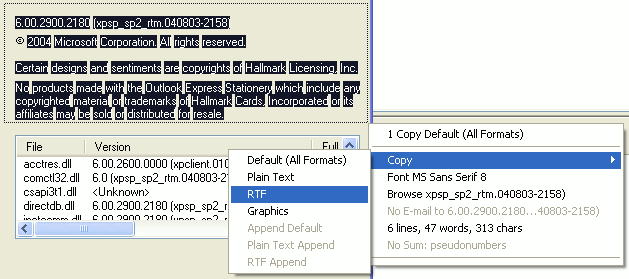
GrabText operates as a character recognition module. After integrating with your Windows system GrabText displays an icon in TaskTray notifications area. Right-clicking the icon brings up the Screen Capture menu. From this menu you can select whether the application should recognize characters from a window under cursor or using selection rectangle, whether it should interpret text only or text and graphics altogether. Left-clicking the icon changes your cursor which means you are ready to go.
Text capture module accepts information from dialogboxes, messages, HTML, PDF, graphics, and even 3D. Once you have selected the desired object for character recognition, GrabText starts recognizing text using its font samples database. Afterwards, you can copy the captured text to clipboard as plain text or rich text format (RTF). Screen Capture tool can even append text captured to current clipboard contents.
Back to Grab Text Details page
- Grab Text From File
- Grab Text From Window
- Text Grab Mpeg
- Grab Text Screen
- Grab Email From Text File
- Web Page Text Grab
- Screen Grab Video Grab
- Grab Cd To
- How To Grab
- Grab For Os X


