
LibMaster.com Extendable Calculator Screenshot
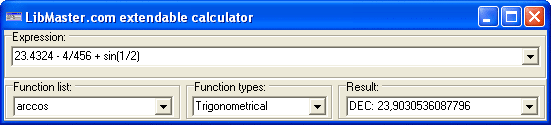
Usually software calculators imitate hardware calculators. It allows Users the ability to quickly start their work with a new program, since the user already knows how to use their hardware calculator. But with this approach, in regards to the design of software calculators, it inherits all of the defects of hardware calculators. For example:
- Every number, operator, or function that is inputted separately at that priority must be kept in mind. For example, if a calculation is made in ordinary calculator expression 2+2*2 then result is 8, but if 2*2+2 is calculated, then the result is 6. Certainly 2+2*2 and 2*2+2 is equivalent. This is how ordinary calculators provoke errors.
- The window of the program is painted in the form of a device with many unnecessary buttons, and a single indicator for input and output will occupy a lot of "real estate" on the screen.
- You cannot input expressions for calculations as a formula, for example: 123.32-12.4/sin(1/2)
Every number, operator, or function must be entered separately, independent of one another.
Therefore you cannot edit expressions that were previously entered. For example you cannot calculate: 123.32-12.4/sin (1/2) and later 123.32-12.2/sin (1/2) You must enter all of the formula anew because one number is different then the other.
- Painted buttons provoke heavy mouse usage for input, but it will greatly reduce input speed of expressions. This is good for calculating, but it does promote fatigue of hand, due to mouse usage. For the necessary button search, a need is to permanently reread button captions or remember the last button location.
The LibMaster.com Extendable Calculator is a different way to approach calculator design. Therefore it does not contain any of the design defects, as outlined above.
Back to LibMaster.com Extendable Calculator Details page
- Libmaster Extendable
- Extendable Table
- Incometax Calculator Only Calculator
- Ip Calculator
- Jd Calculator
- Bb Calculator
- Pc Calculator
- St Calculator
- New Calculator
- Calculator Vb


