
Personal Timeclock Screenshot
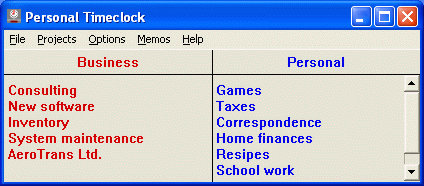
Do you use your computer for business as well as pleasure? Then Personal Timeclock can save you money at tax time! Do you use your computer to do work on behalf of clients? Then Personal Timeclock can help you bill your clients accurately. Do you have employees that use computers? Personal Timeclock can keep track of their time, too.
Personal Timeclock is a Windows XP/Vista/Win7/Win8/Win10 program that keeps track of time you spend on your computer. Time is charged to one or more "projects" that you chose by "punching in" when you begin work on each project. In addition, projects may be grouped into different "categories" (e.g. business and pleasure) of your choice. To give one example, you can create a category for each of your clients, and a project for each different type of work you perform. To keep track of your time, simply click on the proper project when you begin working on it. If you wish, you can add a memo to further describe your work. You can also add an hourly rate to each project and category and include the amount on reports.
Personal Timeclock Reporter produces detail reports, which list the specifics of your work, and summary reports, which summarize your work by project and by category. Both types of reports can be customized to show exactly the data you want. For example, if you categorize your projects as business and non-business, the summary report will give the hours and percentage of time spent in each category. This is the figure that you need for IRS form 4562 Depreciation and Amortization, lines 24c and 25c. In addition, you can answer "Yes" on line 23b which asks whether you have written evidence to support the claimed business use: this may reduce the chances that your return will be selected for audit. [The line numbers were from 2000 tax forms, and may differ in later years.]
There are other time manager programs, but Personal Timeclock is simple (so simple that you will use it),and it does the job well.
Back to Personal Timeclock Details page
- Cs Timeclock
- Timeclock Plus
- Timeclock Help
- Timeclock Lyte
- Timeclock Ubuntu
- Sunrise Timeclock
- Peachtree Timeclock
- Internet Timeclock
- Free Timeclock
- Timeclock Work


