CodeTwo Outlook Export Screenshot
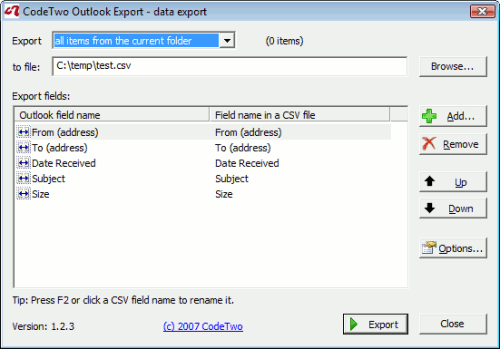
CodeTwo Outlook Export is an easy-to-use free tool for quick and advanced export of data from Microsoft Outlook to CSV text files. The program allows exporting much more data than offered by the built-in export feature in Outlook, allowing the export of non-standard user-defined fields from Outlook and is quicker and easier to use. Data can be exported from folders of all types, such as: Contacts, Calendar, E-mail, Post, Tasks, Journal, Notes.
After installing the program, the new icon will appear in the standard Outlook toolbar. Clicking it runs CodeTwo Outlook Export.
In the CodeTwo Outlook Export window a user can choose whether to export data from all items in the current folder or to export only the selected items. Then the user defines the path to the CSV file to store the exported data.
After clicking the Add button the Field chooser dialog will be displayed. It allows you to add fields of data exported to the CSV file to the Exported fields list. The Field chooser dialog box displays a variety of fields, depending on the folder type, from which the data is currently exported.
In order to add exported fields to the Exported fields list, you need to select them in the Field chooser dialog box and click the Insert button. You can select more than one field at a time. The Field chooser initially displays standard Outlook data fields only. To display user-defined fields, created in a folder or in the other objects, click the Refresh button. If after selecting the Refresh command, a user-defined data field does not appear in the Available fields list, the name must be entered in the Custom field name field and you need to click Add. The field will then be added to the Available fields list.
Back to CodeTwo Outlook Export Details page
- Codetwo Outlook Autoconfig
- Codetwo Outlook Sync
- Codetwo Outlook Attachment Reminder
- Codetwo Outlook Reply All Reminder
- Export Outlook Express Folders To Outlook
- Export Outlook Express Messages To Outlook
- Export Outlook Express Emails To Outlook
- Export Outlook Ost To Outlook Pst
- Export Outlook Express Data To Outlook
- Mac Outlook Export To Windows Outlook