PCWin Software Download Center
 
Product Home
Download Trial
Purchase
Author Site

Category

 
Audio
Business & Finance
Desktop Enhancements
Cursors
Font Tools
Fonts
Icon Tools
Icons
Misc. Themes
Movie Themes
Music Themes
Screensavers
Shell & Desktop Managers
Skins
Sports Themes
Start-up/Shutdown
TV Themes
Wallpaper
DVD & Video
Games
Home & Education
Internet
Multimedia & Design
Security & Privacy
Software Development
Utilities
Web Authoring


Popular Downloads

 
TubeHunter Ultra
EasySystemCleaner
More than 30.000 vista icons
Aurora Web Editor 2007 Professional
MySpeed PC Lite
eScan Pro Edition
HelpVistaXPDiamond
WAB-Processor
Win Guard Pro
Antivirus Premium
 

New Downloads

 
Flash Forum
Aerize Email Alerts
WorkTime
MultiFind
SQLBackupAndFTP
Income Calculator Pro
Effective File Search
Open PGP command line
Text Speaker
ImageConverterPro
 

Related Downloads

 
Customize Desktop
Customize Icon
Desktop Custom
Custom Desktop
New Folder Icon
Folder Icon Xp
Folder Pc Icon
Change Folder Icon
Free Theme Icon
Free Icon Theme
 

CustomIcons

CustomIcons 5.0

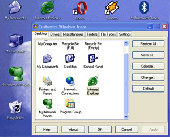
CustomIcons is an ultimate tool for customizing the icons on your desktop, in Windows Start menu, for your folders and many other locations. Using CustomIcons you can easily replace default Windows icons with the ones to your choice. Download CustomIcons by Icon Empire

Screenshot of CustomIcons
Publisher: Icon Empire
License: Shareware
Price: USD $15.95, EUR11
Filesize: 1.3 MB
Date Added: 08/13/2006

CustomIcons is an ultimate tool for customizing the icons on your desktop, in Windows Start menu, for your folders and many other locations. Using CustomIcons you can easily replace default Windows icons with the ones to your choice and customize a wide variety of desktop attributes. Are you bored with your standard run-of-the-mill desktop, which looks exactly like thousands of other desktops all over the world? CustomIcons provides an easy and elegant solution for this problem! Using this small handy tool you can easily replace standard Windows icons with the ones you like and customize desktop attributes. You can change even those icons that cannot be changed using standard Windows tools.

With CustomIcons you can:
1) Replace the default icons Windows uses to display My Computer, Recycle Bin, Internet, Start menu items, drives, shortcut and share overlays, system folders and other objects.
2) Customize user folder icons.
2) Colorize icons and Start menu items.
3) Export any standard Windows icon into an individual ICO, BMP, GIF, PNG or JPEG file.
4) Remove shortcut overlays or replace them with your own images.
5) Change icons size and color resolution without changing your monitor settings (make those icons really big if you want!).
6) Rebuild and repair the icon cache (this feature lets you restore the desktop after a system crash).
7) Create stylish icons from your photos and images.
8) Customize folder and file type icons.

If you like to tweak your system, CustomIcons will definitely be a great addition to your utilities collection.

Category: Desktop Enhancements / Icon Tools


Download | Homepage | Buy Now | Screenshot | Report Error

Related Software

Custom Customize Desktop Folder
Ico Icon Theme Trash
Sib Icon Extractor - Sib Icon Extractor is a handy tool for extracting icons from almost any location, be it a local folder, a zip-archive, a Mac OS icon file or even a website. You can also rejuvenate the look of your desktop with new icons in a couple of clicks.
ICL-Icon Extractor - ICL-Icon Extractor extracts icons from anywhere, be it a library on your PC, or an Internet location. Extracted icons are stored in special collections along with their source information. The tool can be used to customize standard Windows icons.
Sib Icon Converter - Sib Icon Converter allows you to convert multiple digital images and photos to Windows icons in one action. It also breaks down entire icon libraries into individual icons. You can change color resolution and size to create customized icons.
Trash Browser - In many respects the Mac's user interface is fantastic, but it's not perfect and it has a few irritating features too.
EfreeDVD Folder Icon - EfreeDVD Folder Icon allows you to give an icon for all your folders on your computer,making every folder different.
IconChanger - Icon Changer is a software application that makes changing icons on the desktop fun and easy. Change icons to make navigation easier, to group similar applications together or merely to customize and spice up your desktop! Try Icon Changer for free n
Folder Marker - Changes Folder Icons - This small utility lets you change folder icon (mark folders) by priority (high, normal, low), level of project completeness (done, half-done, planned) and type of information stored in them (work, important, temp and private files).
RAW Trash - In many respects the Mac's user interface is fantastic, but it's not perfect and it has a few irritating features too.
Trash it! - Welcome to Trash it!
Icon Genesis - Icon Genesis brings revolutionary, and easy to use icon management; and takes advantage of today’s high performance PCs by introducing "Live!" Interactive and 3D Animated Icons.

More Software of "Icon Empire"

IconoMaker - This icon editor allows to make multi-resolution icons in 16x16, 24x24, 32x32, 48x48 and custom sizes, in monochrome, 16 colors, 256 colors and 32-bit True Color with alpha channel color depths. Modify your icons with helpful paint tools.
Perfect Icon - Perfect Icon makes icon from any graphic file (PGN, JPEG, BMP, TIFF, WMF and more) in just seconds. Create stylish icons for Windows XP. Easily replace, colorize and save icons that Windows uses to display standard objects, folders, files.
Pixel Editor - Pixel Editor is a program to create and edit images for websites or mobile devices. An array of tools to work with pictures and simplicity of use make this product ideal for newbies and graphic design professionals alike.
Icon Craft - Icon Craft is a complete icon and cursor solution. Use it to express your artistic nature and create your own unique icons, cursors and other tiny images. Manage icon libraries, and add a unique look and feel to your desktop and folders.
Icon Processor - Icon Processor is a must-have utility for every design enthusiast. It enables you to convert your favorite photos and images into nifty icons. You can use them to personalize your Windows desktop or give a professional touch to your software product.
Blue Icon Library - Your products will look more modern and attractive with Blue Icon Library. Color formats include Windows XP and 8-bit formats. Available sizes are 16x16, 24x24, 32x32, and 48x48. This icon library includes standard software icons.
Car Icon Library - The SibCode Car Icon set covers a broad range to automobile-related topics: from a car credit to a car, from a jeep to a police car, from car business to traffic lights - all you can think of in a single set. Perfectly designed, perfectly functional!
Financial Icon Library - Vista Financial Icon Library is a collection of money and shopping related icons in Windows Vista style. The collection is distributed as BMP, PNG, GIF and ICO files with each icon present in the 16x16, 24x24, 32x32, 48x48 and 256x256 sizes.
Hardware Icon Library - The Icon Empire Hardware Icon Library is a comprehensive set of icons that covers most of the possible hardware-related application's needs in amazing detail. The choice of professionals at an affordable price! Vista-ready with up to 256x256 sizes.
ICL-Icon Extractor - ICL-Icon Extractor extracts icons from anywhere, be it a library on your PC, or an Internet location. Extracted icons are stored in special collections along with their source information. The tool can be used to customize standard Windows icons.
 

Copyright © 1995-2008 PCWin Download Center. Home | | Privacy | Link to Us | Submit / Update Software