PCWin Software Download Center
 
Product Home
Download Trial
Purchase
Author Site

Category

 
Audio
Business & Finance
Desktop Enhancements
Cursors
Font Tools
Fonts
Icon Tools
Icons
Misc. Themes
Movie Themes
Music Themes
Screensavers
Shell & Desktop Managers
Skins
Sports Themes
Start-up/Shutdown
TV Themes
Wallpaper
DVD & Video
Games
Home & Education
Internet
Multimedia & Design
Security & Privacy
Software Development
Utilities
Web Authoring


Popular Downloads

 
Internet Download Manager
TubeHunter Ultra
EasySystemCleaner
Majestic Waterfalls Screensaver
More than 30.000 vista icons
Visual Renamer
Aurora Web Editor 2007 Professional
MySpeed PC Lite
eScan Pro Edition
HelpVistaXPDiamond
 

New Downloads

 
CapTrue
Froddle Pod
Audio Recorder Titanium
StatPlus Portable
Apen FLAC Ripper
Jesterware DVD to Apple TV
BluEasy
Perspector Lists
Auto Collage Studio
EazyCode
 

Related Downloads

 
Make A Design
Icon Design
Iconos De Stock
Free Icon Make
Make Windows Hlp
Icon Maker
Fre Icon Maker
Icon Maker Gpl
Buddy Icon Maker
Free-Icon-Maker
 

IconoMaker

IconoMaker 3.03

This icon editor allows to make multi-resolution icons in 16x16, 24x24, 32x32, 48x48 and custom sizes, in monochrome, 16 colors, 256 colors and 32-bit True Color with alpha channel color depths. Modify your icons with helpful paint tools. Download IconoMaker by Aha-soft

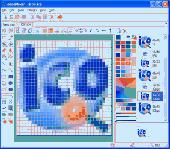
Screenshot of IconoMaker
Publisher: Aha-soft
License: Shareware
Price: USD $29.95, EUR20
Filesize: 1.0 MB
Date Added: 05/29/2006

IconoMaker 3.0 allows you to edit icons for Windows Vista, XP, 2003, 2000, ME, 98, 95, NT and other versions. It supports ICO, PNG, XPM, XBM and other graphics formats. Create and edit icons in either standard or custom sizes, with color depths up to 32-bit True Color, with 8-bit alpha channel. Paint tools include: color replacer, color selector, spray can, pencil, brush, flood fill, text tool, line tool, rectangle, curve and ellipse. For Windows XP and Windows Vista icons, semi-transparency is available.

Launching IconoMaker opens a window with a interface similar to the Windows paint program. You can set IconoMaker to open to a new icon window or nothing. The new icon window shows a grid display with the grid matching the resolution of the icon you want to create. Along the left side are a set of drawing tools typical to most paint programs, including a color picker, eraser, pencil, air brush, paint brush and bucket (flood fill), text, rectangles, ellipses and lines. On the right side of the grid is a color chart (256) to choose from 256 colors. The grid overlay is tabbed, allowing you to open and work on more than one icon, either different sizes of the same icon, or completely different icons. Also shown on the right is a display of how your icon(s) appears actual size. With these tools, anyone can take advantage of the grid overlay and fill in the squares to create an icon that maximizes your artistic skills.

Category: Desktop Enhancements / Icon Tools


Download | Homepage | Buy Now | Screenshot | Report Error

Related Software

32-bit Design Ico Icon
Iconos Make Maker Windows Xp
Xp
IconCool Studio - Complete solution for Vista icon and XP icon editing. Import and Export 25 image formats. Offers 60 image filters, PSD plug-ins, transfering to Photoshop and 500 sample Vista icons.
Easy Icon Maker - Easy Icon Maker is a small and easy-to-use all-in-one icon utility for icon making, editing, changing, extracting, and searching . It allows you editing a transparent or opaque icon. The sizes may be 16 X 16, 32 X 32, 48 X 48, 64 X 64 or custom it as
Junior Icon Editor - This icon editor allows to make multi-resolution icons in 16x16, 24x24, 32x32, 48x48 and custom sizes, in monochrome, 16 colors, 256 colors and 32-bit True Color with alpha channel color depths. Modify your icons with helpful paint tools with easy!
Pretty Icon Maker - Pretty Icon Maker is a powerful icon/cursor editor that will enable you to create beautiful, professional looking icons with ease. The program can create, extract, and convert all windows icons from monochrome(1 bit) to Windows XP Icons with Alpha...
My Buddy Icons - My Buddy Icons is an easy-to-use AIM buddy icon tool. It allows you to customize, modify or make your own buddy icons, then send them directly to your AIM and change the buddy icons.
IconCool Editor - Powerful icon editor and cursor maker to edit icons, cursors and small web graphics. You can create icons from images of 25 formats or edit icons in exe, dll or icl. Supports 60 image filters, desktop capture, Vista icon editing and more.
Icon Works Pro - Icon Works Pro is an easy to use icon editor that has all the functions for creating and editing icons and cursor files. Icon Works Pro can import image files of major formats including PNG, GIF, WMF, EMF, BMP, TIFF, and JPG.
RealWorld Designer - Icon Editor - RealWorld Icon Editor is a feature rich icon maker and extractor. It automatically creates Windows XP compatible icons from images and 3D models. On each generated image, a configurable special effect is applied. 37 icons with source 3D art included.
Wise Icon Maker - Wise Icon Maker can create icons, extract, and convert all graphics to 32-bit color depth Icon.Include comprehensive collection of drawing tools and effects.Have anti-alias and smoothness functions and excellent 3D gradient effects.
ICONStudio - ICONStudio 5.0 is a powerful advanced Icon Maker & Cursor Creator and Extractor for the Personal Computer. ICONStudio 5.0 allows you to create and edit 32 x 32 buddy icons as well as import and export Icons.

More Software of "Aha-soft"

ArtIcons - Find, extract, edit and create Windows icons in color depths up to 32-bit True Color. Import and export ICO, Vista ICO, CUR, BMP, JPG, PNG, PSD, WBMP, GIF images. Create and manage icon libraries. Create and store images with several layers.
IconLover - Create Windows Vista icons, manage icon libraries, and import icons from various image formats. Save time using batch conversion operations. Enhance images using multi-layer design mode. IconLover is made with love!
IconUtils - Once you have installed IconUtils on your computer, you will be able to create and edit icons, toolbars, gif-buttons, convert image files of various formats, download icon libraries from the Internet and even more; all you need in one tool!
IconXP - Icon XP 3.10 is a simple solution to all icons-crafting needs. The program supports 16 million colors 8-bit alfa-channel icons, imports Mac OS icons, alters standard Windows icons and, basically, provides guidelines to a fresh look of your desktop!
Toolbar Icon Set - Toolbar Icon Set is a collection of wonderfully-crafted ready-made icons for use in commercial and personal programs and websites. The icons have a bright color palette, smooth and well-rounded edges. A variety of formats and sizes is provided.
AhaView - This viewer supports all popular graphic formats, including JPEG, GIF, PNG, BMP, ICO, CUR, ANI, TGA. You can browse images in thumbnail mode, view pictures full screen with zooming features, convert images to JPEG, PNG, BMP formats and manage files.
Icon to Any - Icon to Any lets you convert any icon, or cursor to an image. The tool comes packed up with an intuitively transparent wizard-style interface, support for a great variety of graphic formats and flexible output configuration settings.
ArtIcons Pro - Find, extract, edit and create Windows icons in color depths up to 32-bit True Color. Import and export ICO, Vista ICO, CUR, BMP, JPG, PNG, PSD, WBMP, GIF images. Create and manage icon libraries. Create and store images with several layers.
Any to Icon - Any to Icon is a wizard-style converter for producing attractive Windows or Mac OS icons from an image. Many graphic formats are supported. Output customization includes options such as icon size, color depth, and transparency.
ArtCursors - ArtCursors allows you to edit static and animated cursors in color depths up to 32-bit True Color. You also can search files and folders for cursors, import and export cursor images and create cursor libraries for better and more efficient storage.
 

Copyright © 1995-2008 PCWin Download Center. Home | | Privacy | Link to Us | Submit / Update Software