PCWin Software Download Center
 
Product Home
Download Trial
Purchase
Author Site

Category

 
Audio
Business & Finance
Desktop Enhancements
DVD & Video
Games
Home & Education
Alarm Applications
Astrology & Numerology
Calendars & Planners
Clocks
E-books & Literature
Food & Beverage
Genealogy
Health & Nutrition
Hobbies
Home Inventory
Kids & Parenting
Language
Mathematics
Miscellaneous
Music
Religion & Spirituality
Science
Sports
Sticky Notes
Teaching Tools
Wining & Dining
Internet
Multimedia & Design
Security & Privacy
Software Development
Utilities
Web Authoring


Popular Downloads

 
Internet Download Manager
TubeHunter Ultra
EasySystemCleaner
Majestic Waterfalls Screensaver
More than 30.000 vista icons
Visual Renamer
Aurora Web Editor 2007 Professional
MySpeed PC Lite
eScan Pro Edition
HelpVistaXPDiamond
 

New Downloads

 
Bytescout SWF SlideShow Scout
Hollow Ground
X360 Image Processing ActiveX Control
Time Meter for Microsoft Outlook
TurtleTed Memory Album
DzSoft PHP Editor
Aiseesoft DVD to AVI Converter
Alive Organizer
AVG Anti-Virus Free Edition
Sync software
 

Related Downloads

 
System Tray Icon
The Icon In System Tray
Add Icon To System Tray
Get System Tray Icons
Taskbar Tray Vb
System Performance
System Tray
System Tray Cd
Hdd System Tray
Hide System Tray
 

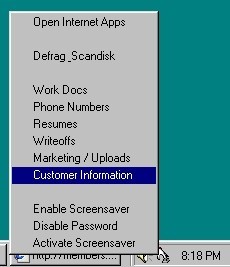
EasyTray System Tray Screenshot
EasyTray System Tray

Open various program combinations, documents, and webpages, simultaneously with one mouse click from your system tray. You can also open any website directly from your system tray. This software places an icon in your system tray (bottom corner of your screen), and from this icon, you can assign a large list of programs you would like to run, and you can open many applications simultaneously with just one click. This is a time saving program which enables you to quickly access any programs or documents, open many applications at one time, open webpages, and even start your screensaver from the system tray icon. You can also open applications with documents already pre-loaded, enable or disable your screensaver, and enable or disable your screensaver password, all from the system tray. (Runs on all Windows systems).


Back to EasyTray System Tray Details page

EasyTray System Tray Screenshot Related

Icon Icons Icontray Oneclick
Performance Screensaver Screensavers System
Systray Taskbar Tray Trayicon
 

Copyright © 1995-2008 PCWin Download Center. Home | | Privacy | Link to Us | Submit / Update Software