
LeoCalculator Screenshot
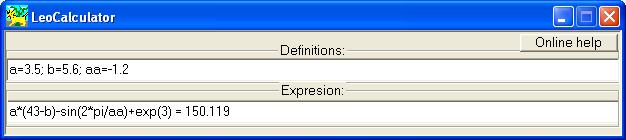
LeoCalculator is an application for performing calculation of mathematical expressions that could include not only basic operations but also functions and brackets.
Edit box "Expression" has to contain a string of mathematical expression that is supposed to be calculated.
It can contain:
numbers in with or without decimal point and with or without a power of 10 like 1.2e-2 or 3.E3;
pi in this application is equal to 3.141592653;
basic mathematical operations +,-,*,/;
power of grade operation ^ used like 2^3 = 8;
brackets determining order of operation execution;
major functions: sin,cos,tan,asin,acos,atan,ln,log10,exp,pow10,abs,sqrt. Arguments of the functions have to be an expression surrounded brackets;
variables determined in the edit box "Definitions";
Edit box "Expression" can contain definitions of variables:
variables can be any combinations of letters and numbers without spaces and reserved words: e, E, pi, sin, cos, tan, asin, acos, atan, ln, log10, exp, pow10, abs, sqrt (not case sensitive);
value expressions as usual are numbers but in most cases it could be mathematical expressions too. Tip: variable expression that contains other variables should be longer than them.
To perform calculation press key "Enter" or print letter "=" after expression you want to calculate. The result will appear after mark "=". You can do standard manipulation with "Expression" edit box such as copy/paste operation. Editing "Expression" box just after calculation will force the disappearance of result. The main idea is that the result value has to correspond with the expression.
Back to LeoCalculator Details page


