
Double Password Screenshot
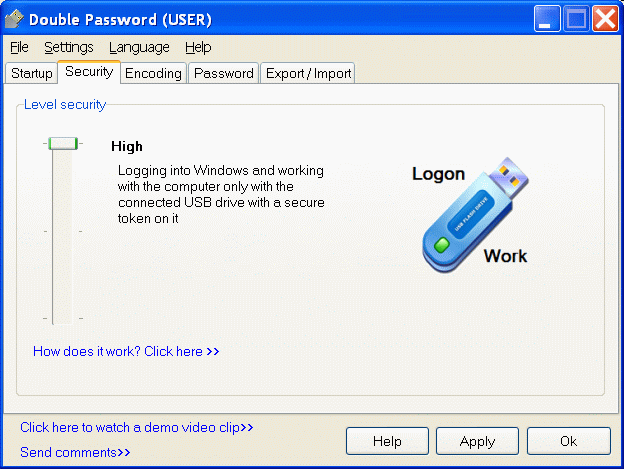
Want to be sure that no one except you can get easy access to your personal computer? Simply install Double Password! This program breaks fresh ground in your computer security. First of all, it makes sure that you are the only person, who can log into your OS. But how can it be? In fact all the process is a quick one. Double Password creates your security token on your flash drive (or other USB gadget, such as an MP3 player, PDA or even a USB-pluggable mobile handset) and this device becomes a key to your OS. No key - no access.
Double Password gives you an opportunity to choose the level of your security: low, medium and high. The first means that protection is actually disabled and all users may log into your system. The second level means that a user can log into your OS only with the help of a special security token, which has been previously created on a USB gadget. The third one is close to the second, yet here you cannot even work if your security token is not inserted. Thus, the highest level of security ensures that your computer works in your presence only.
Your security token can be protected with a password and this only enhances your information security. However, when you try to protect your data with a usual password you face a fly in the ointment: this kind of password is easily intercepted by a spy program, which records all your keystrokes. How can we handle this? And again Double Password has a built-in solution to the problem: it encrypts all passwords in a special way and as a result it memorizes a different password, not the one you have entered. You can see this encrypted password, but it is hidden from others.
Double Password has a very clear and elegant interface style: a line of tabs, each configures a certain setting: startup, password, encoding, etc. In the end, you get a simple and strong means to keep your data safe and secure!
Back to Double Password Details page
- Double Password Protected
- Sudoku Solver Double Double
- Remove Double Copy Files Double Copy
- Double Take
- Double Six
- Double Bubble
- Double Barrel
- Double Scorpion
- Solitaire Double
- Double Bucks



