
PCWin Software Download Center
 
Product Home
Download Trial
Purchase
Author Site

Category

 
Audio
Business & Finance
Desktop Enhancements
DVD & Video
Games
Home & Education
Internet
All-In-One Messengers
Anti-Spam
Bookmark Managers
Browser Accessories
Browsers
Cache and Cookie Utilities
Chat
Communications
Dial-up & Connectivity
Download Managers
E-Mail Checkers
Email
FTP
File Sharing
Flash Tools
Form Fillers
ISPs
Internet Phone and Teleconferencing
Misc. Plugins
Misc. Servers
Monitoring
News Applications
Newsreaders
Offline Browsing
Online Privacy
Parental Filters
Pop Up Blockers
Proxy Servers
RSS & Web Blog Tools
Remote Access
Ringtone Tools
SMS
Terminal and General Utils
Tools & Utilities
Usenet Binary Downloaders
Web Accelerators
Web Search Utilities
Web Servers
Multimedia & Design
Security & Privacy
Software Development
Utilities
Web Authoring


Popular Downloads

 
Internet Download Manager
TubeHunter Ultra
EasySystemCleaner
Majestic Waterfalls Screensaver
More than 30.000 vista icons
Visual Renamer
Aurora Web Editor 2007 Professional
MySpeed PC Lite
eScan Pro Edition
HelpVistaXPDiamond
 

New Downloads

 
PloCon
Cyber RM Converter
Jitbit RSS Feed Creator
Holy Pio Screen Saver
Dynamic scroll bar
DzSoft PHP Editor
LanFlow Net Diagrammer
Office Recovery Wizard
Standard Transport Icons
OLMixedFolders
 

Related Downloads

 
Packet Sniffing
Packet Sniffer
Http Packet Sniffer
Packet Monitor
Network Traffic Monitor
Free Packet Lan
Free Cisco Router Simula
Prtg Cisco Mibs
Tds Packet Sql
Tds Packet
 

Paessler SNMP Tester Screenshot
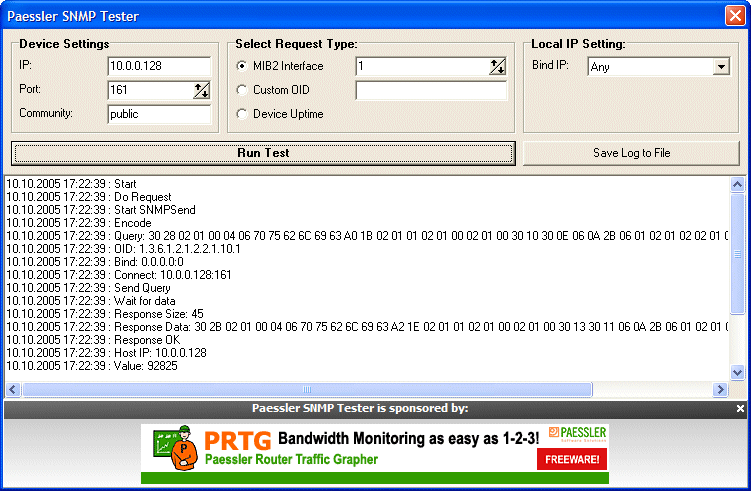
Paessler SNMP Tester

With Paessler SNMP Tester you can run simple SNMP requests against a device in your network. During the test each single step of the SNMP request is logged into a logfile for analysis. The idea of this free program is to debug SNMP requests down to the protocol level in order to find communication and/or data problems in SNMP monitoring configurations.

Just follow these simple instructions:

1) Download Paessler SNMP Tester and run the snmptest.exe file.

2) Enter the IP address of your device and select the SNMP port and the SNMP community string.

3) Select a request type:
(a) MIB2 Interface: Reads the traffic counter of a port according to the MIB2 OID
(b) Custom OID: Enter a custom OID value to access any OID value on the device
(c) Device Uptime: Reads the standard system uptime value from the device

4) It may be necessary to select a specific local IP for the SNMP request (usually only necessary for multi homed systems)

5) Click on "Run Test" to start the testing process.

6) During the test you will find detailed information in the logfile window.


Back to Paessler SNMP Tester Details page

Paessler SNMP Tester Screenshot Related

Bandwidth Cisco Firewall Free
Freeware Graph Ip Monitor
Monitoring Mrtg Netflow Network
Packet Sniffer Packet Sniffing Prtg Router
Snmp Traffic Usage Volume
 

Copyright © 1995-2008 PCWin Download Center. Home | | Privacy | Link to Us | Submit / Update Software
