
|
|
|
 |
Category |
 |
| |
|
|
|
|
 |
Popular Downloads |
 |
| |
|
|
|
|
 |
New Downloads |
 |
| |
|
|
|
|
 |
Related Downloads |
 |
| |
|
|
|
|
 |
Popular Searches |
 |
| |
|
|
|
|
|
LockYourKeyboard 2.0 |
|
|
LockYourKeyboard is a parental control utility that prevents toddlers from accessing PC. With just one hotkey press, parents can disable keyboard, mouse, Power button, CD/DVD-ROM and go away, feeling secure the kid can no longer destroy anything..
Download LockYourKeyboard by BitCrowd
|
|
|
|
|
LockYourKeyboard is an elegantly simple software lock that parents install on the computer and use to prevent toddlers from accessing the computer while they're away. LockYourKeyboard can lock the keyboard, mouse, Power button and CD/DVD-ROM drives selectively or all at once. The utility is easy to install, gives complete control, is inexpensive and can be very effective in helping to protect the computer from naughty kids.
Using LockYourKeyboard is as simple as turning a key. To lock the computer, you need to press only a combination of hotkeys. By default, it's SHIFT + right SHIFT. The buttons are separated from each other on the keyboard, so it'll be hard or even impossible for a toddler to press both buttons together. When you have to go away for a while and don't want your toddler to go nuts on the computer, just press this combination to lock up the computer and feel secure the child can no longer destroy it. For example, when the kid, attempts to stop the movie during the DVD playback or play the crazy piano on the keyboard, LockYourKeyboard will prevent this from happening. When you come back, you unlock the computer by pressing the same hotkey combination - SHIFT + right SHIFT and the computer enters its normal working mode. Computer protection is quick, simple, and it works.
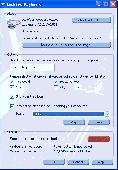
The program is configurable. Once launched, you can do a quick setup on how you want the application to run. You can change the default combination of keys to lock the devices, select the devices to be locked, choose to display the icon in the system tray and select the sound to be played when you lock and unlock the computer.
The specialty of LockYourKeyboard lies in its unique ability to disable all keyboard keys (system keys, Power button, Sleep mode button), while similar applications will not allow this. To lock keyboard keys, LockYourKeyboard uses filter drivers, rather than Windows API calls, which ensures better control over input devices.
PCWin Note:
LockYourKeyboard 2.0 download version indexed from servers all over the world. There are inherent dangers in the use of any software available for download on the Internet.
PCWin free download center makes no representations as to the content of LockYourKeyboard version/build 2.0 is accurate, complete, virus free or do not infringe the rights
of any third party. PCWin has not developed this software LockYourKeyboard and in no way responsible for
the use of the software and any damage done to your systems. You are solely responsible for adequate protection and backup of the data and equipment used in connection with using software LockYourKeyboard.
Rating:

|
|
Platform: Windows 2000, Windows 2003, Windows XP, Windows Vista
|
Category: Internet / Parental Filters
|
|
|
| | |
|
|
More Software of "BitCrowd" |
|