
Image Converter .EXE Screenshot
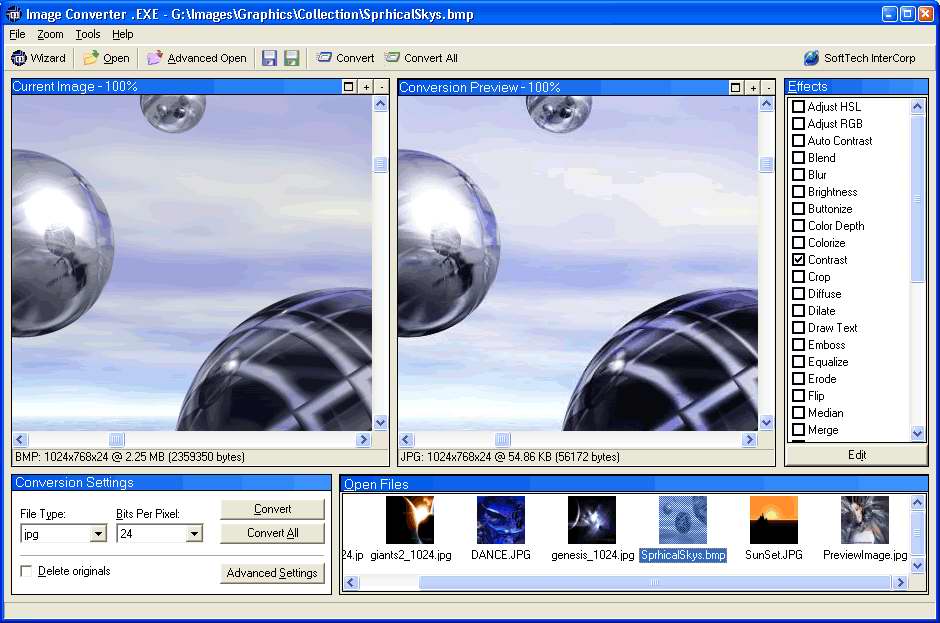
Image Converter .EXE is a fast and flexible image conversion program, which allows support for converting to over 15 formats. It features over 20 effects which can be applied in any conversion process, and even in batch mode. The included Image Conversion Wizard helps with a step-by-step dialog that allows you to select files, set conversion properties (JPG to BMP), apply effects, and set how the converted files will be named. Batch support in Image Converter .EXE allows you to easily add thousands of images to be converted, and with a single click Image Converter .EXE can then convert, rename and add effects in accordance with your settings. To make the process simpler, Image Converter .EXE includes the MediaView Extension from SoftTech InterCorp, form which converting between image types and apply effects can be done by simply right-clicking them. Convert and Rotate 120 selected files right from Windows Explorer.
Image Converter .EXE supports writing to the following formats: JPG, GIF, PIC, TIF, BMP, DCX, DIB, JIF, PBM, PCX, PGM, PNG, PPM, TGA and WPG. Supported effects which can be processed in batch mode include: Adjust HSL, Adjust RGB, Blend, Brightness, Buttonize, Color Depth, Contrast, Crop, Draw Text, Motion Blur, Mosaic, Perspective, Pinch, Posterize, Resample, Resize, Ripple, Rotate, Sharpen, Soften, Solarize, Swirl, Auto Contrast, Blur, Diffuse, Dilate, Emboss, Equalize, Erode, Flip, Median, Mirror, Negate, Outline, Replace Colors, Colorize, Merge. Well Image Converter .EXE supports conversion to any of the 15 supported formats, here are a few of the common types to convert: BMP to JPG, BMP to GIF, BMP to PNG, BMP to TIF, TIF to BMP, TIF to JPG, TIF to GIF, JPG to GIF, GIF to JPG, PIC to JPG, DCX to JPG, DIB to JPG, JIF to JPG, PBM to JPG, PCX to JPG, PGM to JPG, PPM to JPG, TGA to JPG, and WPG to JPG.
Back to Image Converter .EXE Details page
- Myspace Image Exe
- World Image Exe
- Desktop Image Exe
- Resize Image Exe
- Convert Exe File To Image
- Standalone Exe For True Image
- Flash Exe Image Extractor
- Image Boot Usb Exe
- Hiding Exe File In Image
- Av Converter Exe To


