
AmitySource PhotoImpro Screenshot
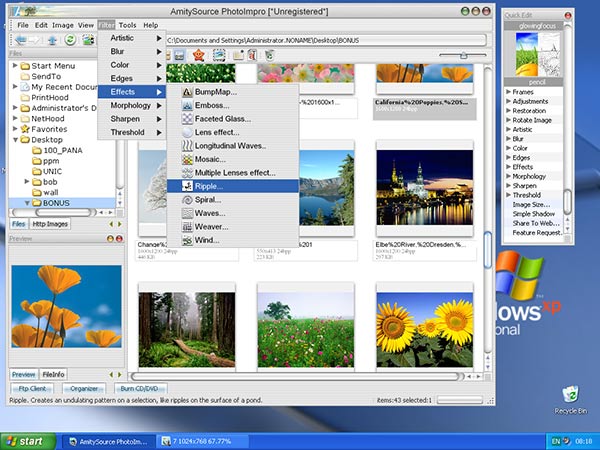
PhotoImpro is all-in-one imaging suite - image editor, enhancer, browser, viewer and organizer with full-featured batch mode. Users gain a wide range of abilities to restore and adjust photos, elaborate them using over 80 filters and effects, fix common photographic problems (such as red eye), share their digital memories with loved ones via printing, burning photos onto CDs or publishing them online for free, and organize them for quick retrieval and viewing.
PhotoImpro is a full-featured batch image editor software application. This feature is easy-to-use, you do not have to understand programming or even scripting in order to perform the batch processing tasks. Just select the files you wish to process, choose the operation for the processing task, and you are ready to go!
Some photos capture a moment that can never be repeated. If there are some defects in your photo, PhotoImpro can help you remove them, saving your precious memories for a lifetime of enjoyment. You can improve photos by applying image adjustments like color correction, brightness, contrast, desaturation and more. Photos with too much noise can be restored with the denoise option. If a photo is blurred or unfocused, the focus corrector can remove these defects. And, of course, there is a red-eye remover to make faces look friendlier!
PhotoImpro "Quick Edit" pane allows you to edit photos without any technical knowledge and get proffesional results!
With PhotoImpro in place, you gain a browser, which is extremely convenient for browsing through photos, and sorting and organizing them. You can easily browse through folders with images and immediately view the thumbnails of photos located in each of them. Clicking on any thumbnail opens it in the preview pane. A double-click on a photo opens it in the built-in viewer. The viewer can display a single image or a group of images. To let you better organize photos, PhotoImpro lets you use virtual folders and the rating system.
Back to AmitySource PhotoImpro Details page


