
Pics Print 3 Screenshot
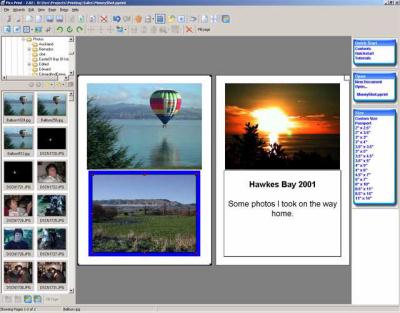
Pics Print is a Windows application that makes it simple to format and print high-quality photos, greeting cards, contact sheets, scrap books, collages, and family albums. Using wizards and templates, you can quickly grab images from digital cameras, scanners or disk, make color corrections and add style to them, resize and annotate them, and print them using your printer's highest quality settings.
Pics Print's folder browser lets you find images fast. With an intuitive Explorer-like folder tree and high-quality thumbnails of all of the images in that folder, identifying the right picture is quick and easy.
You can retrieve photos directly from any digital camera, and create a contact sheet with a single click. Using standard drag-and-drop techniques, you can move the thumbnail images to the final document, resize them, add text, and print them for friends and family.
The program includes WYSIWYG printing. The print preview screen lets you move, resize, and rotate images, so you'll never waste time or ink on pages that aren't exactly what you expect.
Pics Print has a built-in photo editor that lets you crop, resize, rotate, and color-correct images. Users who enjoy adding artistic effects to their photos can blur, emboss, and sharpen the images, add borders, and produce an unlimited variety of creative touches. There is even a red-eye remover that takes out the red circles that the camera's flash often adds to portraits.
You can create instant greeting cards with Pics Print's card wizard. Simply select an image, add text, and print. Using the built-in templates, or templates which you create yourself, you can create family album pages, sales sheets, and any kind of printed pages in just a few minutes. Pics Print lets you create huge posters that are up to 20 sheets tall and 20 sheets wide.
You can now create personalized calendars with the new Calendar wizard.
Back to Pics Print 3 Details page
- Pics Print
- Pics Print Torrent
- Beautiful Fairy Pics To Print
- Edit Pics Insert Pics Software
- Family Cartoon Pics Pics
- Outlook Print Make Print Fit Paper
- Dot Matrix Print Print Programs
- Counting Print Queues In Print Server
- Print Shop Deluxe Print Labels
- Print Excel Circular Labels Print


