
PIX Import for SolidWorks Screenshot
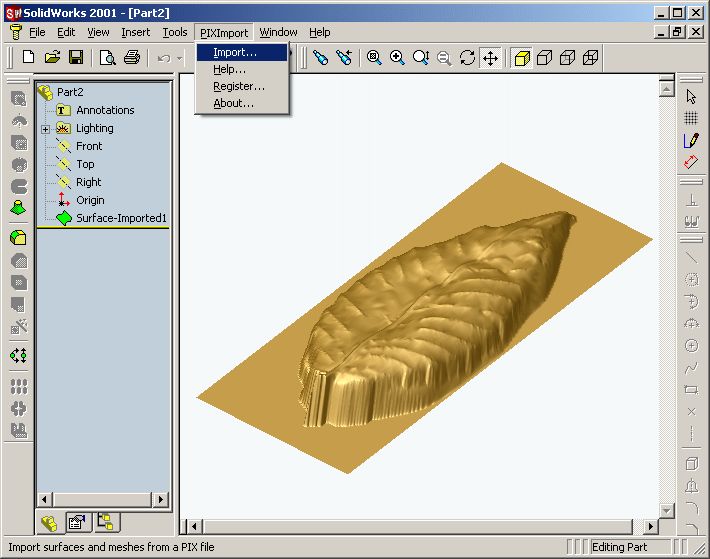
PIX Import for SolidWorks is a Dr. Picza (.pix) file import add-in for SolidWorks®. This add-in gives SolidWorks the ability to import geometric data from PIX files.
PIX Import for SolidWorks reads surface and polygon mesh data stored in PIX files and imports it into SolidWorks. If the PIX file contains a scan of a surface PIX Import for SolidWorks creates a single trimmed surface describing the scanned surface. This surface can be converted into a solid by giving it a thickness. If the PIX file contains the scan information in the form of a polygon mesh PIX Import for SolidWorks creates a body describing the object that was scanned. A polygon mesh in a PIX file is comprised of a set of quad faces. PIX Import for SolidWorks creates trimmed planar surfaces for each quad and knits them together to create a body. If the polygon mesh is closed (i.e. it does not contain boundary edges) then PIX Import for SolidWorks will create a closed body feature, otherwise an open surface will be created.
PIX Import for SolidWorks is very easy to use as it adds new commands to SolidWorks. It also adds a submenu to the SolidWorks menu called "PIXImport".
The 'PIXImport' submenu consists of the following commands:
# Import - Import a PIX file
# Help - Display the PIX Import for SolidWorks help file
# Register - Register your copy of PIX Import for SolidWorks
# About - Display the PIX Import for SolidWorks About box
PIX Import for SolidWorks comes with detailed documentation for each command as well as a tutorial to get you started in the shortest possible time.
The PIX File Format
The PIX file format is the native file format of a digitizer software called Dr. Picza which comes bundled with Roland DG digitizers. The digitizer scans an object and transfers the 3D point data to the Dr. Picza software which saves it in the PIX file format. PIX files can contain scan data in two formats: surface and polygon mesh.
Back to PIX Import for SolidWorks Details page
- Pix Import For Rhino
- Dm Import For Solidworks
- Catia Import To Solidworks
- Import Solidworks To Maya
- Pix Around
- Pix To Pix
- Pix Firewall
- Fill A Pix
- Pix Simulator
- Pix Frogger


