
PCWin Software Download Center
 
Product Home
Download Trial
Purchase
Author Site

Category

 
Audio
Business & Finance
Desktop Enhancements
DVD & Video
Games
Home & Education
Internet
Multimedia & Design
Animation
Authoring Tools
Button Creators
CD Label Creators
Clip Boards
Color Pickers
Digital Media Editors
Flash Tools
Fonts
Graphics Viewers
Illustration
Image Editing
Image Plugins
Kids Cursors
Media Catalogers
Media Management
Multimedia App's
Multimedia Plugins
PDF Tools
Screen Capture
Slideshows
Stylesheets
Video
Security & Privacy
Software Development
Utilities
Web Authoring


Popular Downloads

 
Internet Download Manager
TubeHunter Ultra
EasySystemCleaner
Majestic Waterfalls Screensaver
More than 30.000 vista icons
Visual Renamer
Aurora Web Editor 2007 Professional
MySpeed PC Lite
eScan Pro Edition
HelpVistaXPDiamond
 

New Downloads

 
EverybodyInn
Aunsoft SWF Converter
Web Album Maker
NELiX TransaX FleXport
Comfy Hotel Reservation
Hetman Uneraser
Visual Clipboard Pro
RipTiger Ultimate
PloComp
Exif Pilot Lite
 

Related Downloads

 
Batch Photo Resize
Batch Image Resize
Batch Photo Rename
Batch Rename Photo
Batch Watermark
Batch Add Watermark Soft
Batch Rename
Batch Resize Images
File Batch Rename
Batch File Rename
 

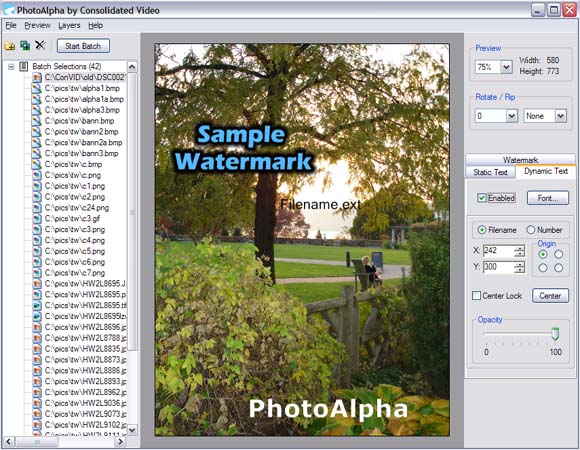
PhotoAlpha Screenshot
PhotoAlpha

PhotoAlpha is an application that allows you to process your photos in batches. Whether its applying a copyright notice or shrinking all your photos to make them easier to share, PhotoAlpha can make the task easier. A free version of PhotoAlpha is offered so you can try before you buy. The free version has all the features of the retail version and never expires. The only limitation is a batch can only contain a maximum of five images.

Batch Watermark with Alpha Blending
Place a graphic or text watermark on all your images. All watermarks can be positioned freely and made translucent. Imported watermarks with an alpha channel are per-pixel blended with the background image.

Batch Resize
Shrink your photos to make them easier to share or make thumbnails.

Batch Rotate
Fix photos taken with the wrong orientation.

Batch Rename
Rename a set of photos with a template and sequential number. Example: "MyTrip001.jpg" , "MyTrip002.jpg" , etc.

Batch Resolution
Change the resolution (pixels/inch) of your photos for when printing demands a specific resolution.

Batch Convert
Change the file format of your photos. Output formats include .bmp , .gif , .png , .jpg , .tif

WYSIWYG Preview
Click on any image in your batch and see a preview with the watermarks applied. Watermarks can also be dragged and updated in real time.


Back to PhotoAlpha Details page

PhotoAlpha Screenshot Related

Batch Convert Image Photo
Rename Resize Rotate Watermark
 

Copyright © 1995-2008 PCWin Download Center. Home | | Privacy | Link to Us | Submit / Update Software