
Pr-desktop protect privacy Screenshot
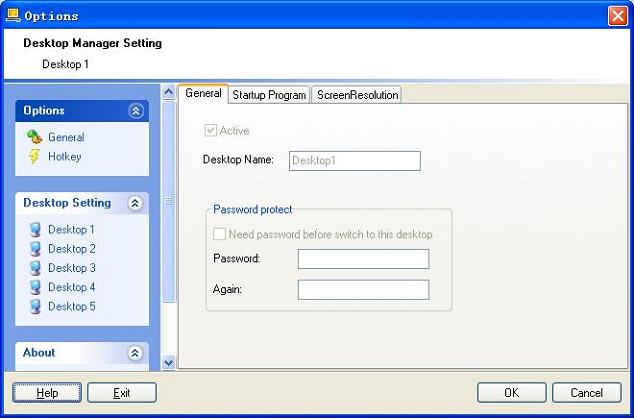
PRDesktop is the ultimate tool to insure your privacy at your computer ,it gives a possibility to have multiple desktops, making your work more comfortable by widening your work space. Its functionality provides instant transfer of any max to 5 screens you wish to maintain at the same time. While you view the screen you do not wish anyone else to see, public screen can be in the holding to make a quick switch within a split second by pressing left and right mouse button at the same time.
Desktop:
You can create max to 5 desktops(default is 3) on your computer.The first desktop is public desktop and the others are private desktop.
Desktop 1:public desktop.Any one can see the contents of this screen.
Desktop 2:private desktop. you do not wish anyone else to see.
Desktop 3:private desktop. you do not wish anyone else to see.
Desktop 4:private desktop. you do not wish anyone else to see.
Desktop 5:private desktop. you do not wish anyone else to see.
Hotkey:
Mouse:
You can switch to desktop 1 (public desktop) by pressing left and right mouse button at the same time ,this feature help you to make a quick switch within a split second.
Keyboard:
Alt+1 - switch to the 1st desktop
Alt+2 - switch to the 2nd desktop
...
Alt+5 - switch to the 5th desktop
Shift+alt+A -Show/Hide prdesktop's tray icon.
Shift+alt+X -Show options windows.
Shift+alt+S -Switch to next desktop.
Back to Pr-desktop protect privacy Details page
- Protect Your Privacy
- Privacy Protect H
- Mobile Privacy Protect
- Access Remote Desktop Privacy
- Protect Desktop Xp
- Desktop Protect
- Desktop Protect Software
- Password Protect Desktop
- Shadow Protect Desktop Review
- Privacy Eraser Pro Internet Privacy


