
TGrab Screenshot
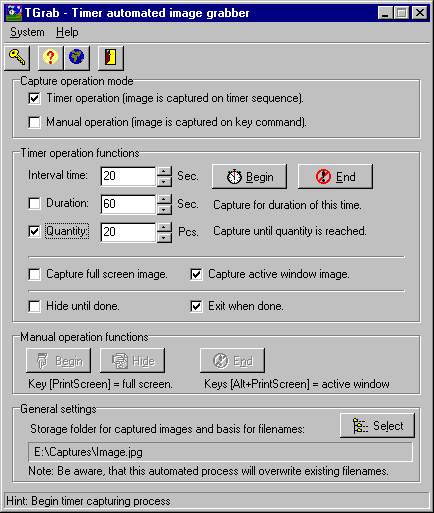
TGrab V1.6: your Timer automated image Grabber.
TGrab is a new type of "image grabber", a utility to take snapshots of either your full windows desktop screen or the active window. It can not only take screenshots in a manual mode (like most others), but also in a timer automated mode.
You can actually configure TGrab to take a picture at a preferred timer interval, either during a time limited session or until a quantity of images is reached (or both). If preferred, it can even run totally invisible and/or close itself when the task is completed.
TGrab runs in the background, while you are using the program from which you want to obtain pictures. At every snapshot command (wether invoked by the timer mode or manual) the active window (or full screen) is captured and saved to a disk file (in either a .jpg or .bmp format), using a sequentially numbered filename (as in "MyFileName(##).bmp"). You don't need to do ANYTHING about this process, it's fully automated.
If you feel the need to do so, than you can process these image files afterwards in your preferred image editor.
The use of TGrab can be both:
- business: where you'd be wanting to get copies of application dialogs or other screen output, for use in presentations or on website pages.
- recreative: you might think of a situation where you'd be wanting to get a series of snapshots from your favorite action game (for these, see an important note below).
(Please note - recreative use: Some games operate in "non-windows video memory", as for example some games that use additional video accellerator cards, such as the powerful 3Dfx cards. The graphic representations, created by these cards, are often created outside of the "normal" windows video memory and these are - as such - mostly NOT within reach of the TGrab (and Windows) image snapshot routines).
Back to TGrab Details page


