
Ez PC Lock Screenshot
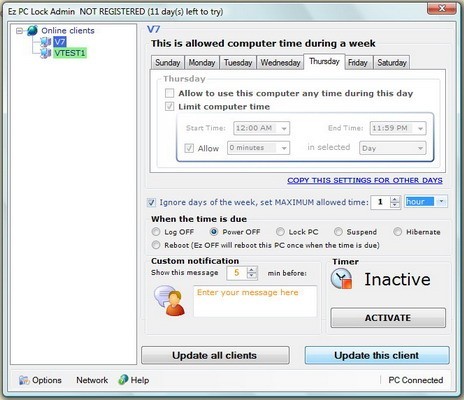
Ez PC Lock allows you to remotely control the PC access time of any computer that you allow your employees or contractors access to, anywhere in the World. You can Lock, Restart, turn the power off on any PC.
Automatic PC Power OFF, Lock Down or Reboot when scheduled
Separate time schedule for each day of the week
Works on any network and behind firewalls and proxies
Communications between the server and clients secure and encrypted
Controls PC time even if a computer not connected to the network
Time accumulation (allows seting maximum PC use time)
Windows XP, Vista 64 bit compatible
System Time protection
System Resources protection (Task Manager blocking)
For example, your company has flexibility to allow your employees to work from home. You gave laptops to a group of people and want to make sure that they don't use these laptops for their own needs. By minimizing use of Computers and Laptops when it is not for your business, you will extend your hardware lifetime and also minimize the chance of your system being destroyed by Viruses, SPY or Adware. So, you can create a schedule for each of your employees, say to allow PC use from 9 to 5 PM Monday to Friday and have the other time your laptops or PCs turned OFF.
Example 2: Your Company does some research, so you hired temporary staff to collect some data for you. After they finished the work, they have to return laptops to you. Some of your contracted employees didn't bring the laptops in time, so you can send a command with Ez PC Lock to these laptops to lock them, making this laptops and its data useless until it unlocked again. So, you make these employees to contact you as soon as possible.
Example 3: You are leasing company and collecting money for sold laptops on a monthly basis. At some point you stopped receiving money from one of your customers, so, you can send a command with Ez PC Lock to lock this person's computer until he contacts you and the payments will be made in full.
Back to Ez PC Lock Details page
- Privacy Lock Device Lock Mobile
- Mobile File Lock Folder Lock
- Snoop Lock Mic Lock
- Folder Lock Or Phone Lock
- Privacy Lock Device Lock
- Folder Lock Advance Lock
- Lock Folder Lock File
- Folder Lock Lock
- Lock Lock Folder
- Lock Lock Drive


