
Hide Folder HiBit Screenshot
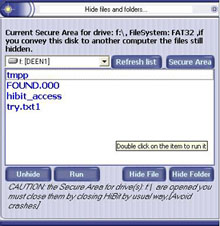
Program main functions:
[1]-Protect any folder or file by : Hide, Lock, Encrypt or Fake it
[2]-The protected folders or files still protected even in other computers
[3]-You can lock files on a computer and unlock them on another computer
[4]-The protect Operation just take 3 seconds at any computer
[5]-You can undelete the folder or file by Locking it.
[6]-FileSystem: NTFS, FAT32 and all other file systems
[7]-HiBit suitable with (1)Fixed disk (2)Removable disk (3)External disk (4)Flash disk (5)Floppy disk
[8]-Crypt Text Editor: you can type some words and it will be encrypted automatically letter by letter immediately
Some Technical Information:
-Windows version: NT, 2000, 2003 server, XP and now Vista
-FileSystem: NTFS, FAT32 and all other file systems
-More security: We advice you to use HiBit to hide folders or files on FAT32 if you want more security, this because the folder or file hidden by HiBit on FAT32 FileSystem will not be changed and still in hidden status on other PCs and computers, or other platforms like UNIX and other windows versions.
-Fastness: if you want more fastness and don't care for more security on other platforms and other PCs you can use HiBit on NTFS filesystem.
-Large Files: there is no relationship beween HiBit speed to hide folder and the size of that file, but a large number of files into that folder may confuse HiBit and make it runs slow in compare of usual times.
-Removable Disks: HiBit it is a perfect solution for Portable and removable disks because you may use a removable disk in another computer, if you do that you will notice that your secret files/folders still hidden there.
-Fake Folder: you can use 'Fake Folder' function to fake your folder with another system folder form(system folders like My Compter, Recycle Bin etc.. folders), if someone opens your secret folder he will be taken to another system place, the folder still faked even on other computers.
Back to Hide Folder HiBit Details page
- Hide Folder Xp
- C Hide Folder
- Hide My Folder
- Xp Hide Folder
- Folder Hide Xp
- Folder Hide C
- Hide Xp Folder
- Repair Hide Folder
- Hide Folder And Images
- Hide Folder Android


