
PCWin Software Download Center
 
Product Home
Download Trial
Purchase
Author Site

Category

 
Audio
Business & Finance
Desktop Enhancements
DVD & Video
Games
Home & Education
Internet
Multimedia & Design
Security & Privacy
Software Development
ActiveX
Compilers & Interpreters
Components & Libraries
Components: Delphi
Components: VB
Databases & Networks
Debugging
Help File Utilities
IDEs & Coding Utilities
Installation Programs
Java
Management & Distribution
Misc. Programming
Project Management
Reference & Tutorials
Source Code
Tools & Editors
Visual Basic Runtime Files
Utilities
Web Authoring


Popular Downloads

 
Internet Download Manager
TubeHunter Ultra
EasySystemCleaner
Majestic Waterfalls Screensaver
More than 30.000 vista icons
Visual Renamer
Aurora Web Editor 2007 Professional
MySpeed PC Lite
eScan Pro Edition
HelpVistaXPDiamond
 

New Downloads

 
CapTrue
Froddle Pod
Audio Recorder Titanium
StatPlus Portable
Apen FLAC Ripper
Jesterware DVD to Apple TV
BluEasy
Perspector Lists
Auto Collage Studio
EazyCode
 

Related Downloads

 
Connection String
Encrypt String
Access Tables
Secure Passwords
Secure Your Passwords
Secure Database
Secure Access
Security Utility
Ms Access Database
Database Utility
 

MDBSecure Screenshot
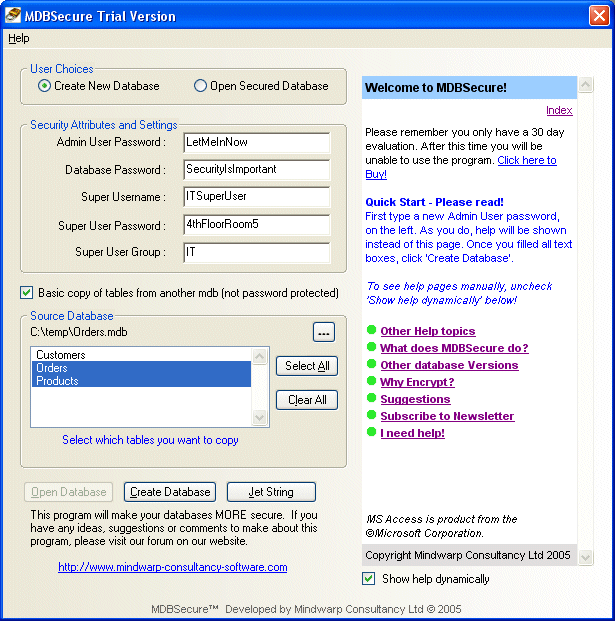
What is MDBSecure? An MS Access Security utility, providing protection for your databases. MDBSecure follows the recommended approach to securing Microsoft® Access databases, it will encrypt your access database and remove security weaknesses. Although nothing is ever 100% secure in computing, following this approach will make an MS Access Database more secure. For more information about the theory behind securing MS Access databases please see the SECFAQ (security FAQ) document. Features: Removes Admin user permissions, Assigns new super user, Encrypt database, MS Access 2000/2002 format, Workgroup creation, Append tables from another DB, Creates Jet Connection Strings, Opens Secure Databases with MS Access, Check for Updates, Easy to use help provided. What does MDBSecure do to secure a database? 1.Create new workgroup, Join it, 2.Open up a database or create new one, 3.Create Super User with password, 4.Log out / then login in with it, 5.Create new database, Add passwords for Admin, 6.Start modifying permissions, Remove them from Admin and Admins Group, 7. Now Encrypt, 8. Add new groups and permissions, 9. Import tables etc from master database, ownership will have changed. Keywords: Encrypt, Access, database, passwords, secure, security, utility, admin, Jet, Connection String, append, tables, users. 30 day unconditional money-back guarantee! 30 day trial.


Back to MDBSecure Details page

MDBSecure Screenshot Related

Access Admin Append Connection String
Database Encrypt Jet Mdb
Passwords Secure Security Tables
Users Utility
 

Copyright © 1995-2008 PCWin Download Center. Home | | Privacy | Link to Us | Submit / Update Software