
.NET Win HTML Editor Control Screenshot
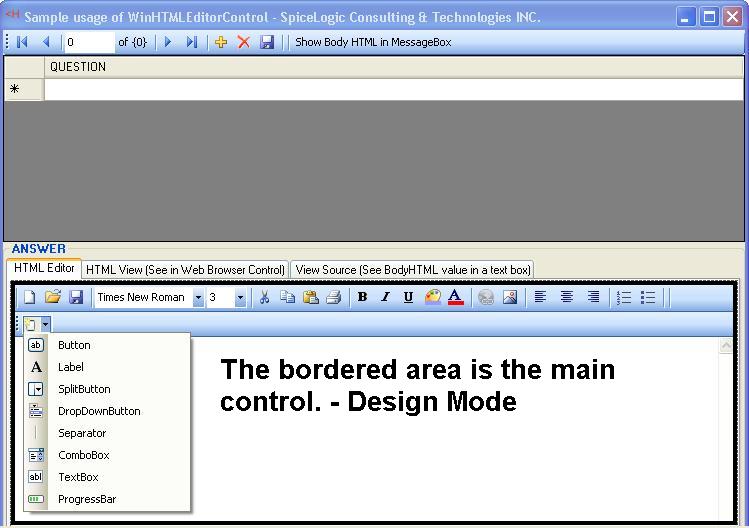
This is a simple and user friendly control rich text content editor control (GET HTML Output or SET Html Content) for your Windows Application. You can also use this control as a HTML Content Viewer by setting the readOnly property. The main benifit of this control is a nice databinding feature. You can show your database string fields which contains HTML content directly using this control. The Toolbar is customizable using your own graphics, text and Event handlers.
.NET Win HTML Editor 2.0 facilitates you by providing 2 completely customizable toolbar controls where you get the real time Visual Studio ToolStrip Control Interface. That means, you will get a common toolbar (Visual Studio ToolStrip) and an Extra Toolbar (Visual Studio ToolStrip). Both of them can be set Invisible or Visible. You can simply add as many buttons as you want by simply clicking on a toolbar. You can add your own Event Handlers for any of the event occurred to those toolbar, or your custom buttons. Simply Double clicking your own toolbar button will create empty method for Click Event Handler for your custom button's Click Event.
Fully functional Trial Version avaialble for download with a sample project solution for Visual Studio 2005.
Easily integrated into Visual Studio .NET 2005 (i.e. C#, VB.NET winforms) project
Basic enough for even the most novice of users
Royalty Free Distribution of the .NET control DLL with your applications Licensed per developer workstation.
Back to .NET Win HTML Editor Control Details page
- NET Win HTML Editor Control
- Net Editor Control
- Win Html Editor
- Word Editor Control Vb Net
- Text Editor Control Vb Net
- Html Editor Vb Net
- Html Editor In Vb Net
- Asp Net Html Editor
- Control Html Editor
- Editor Html Control


