
PCWin Software Download Center
 
Product Home
Download Trial
Purchase
Author Site

Category

 
Audio
Business & Finance
Desktop Enhancements
DVD & Video
Games
Home & Education
Internet
Multimedia & Design
Security & Privacy
Software Development
Utilities
Antivirus
Backup
Command Line Utilities
Desktop Enhancements
Device Drivers
File & Disk Management
File Compression
Font Tools
Icon Tools
Launchers
Misc. Utilities
Network
Optimizers & Diagnostics
Printers
QuickLaunch Utilities
Screensavers
Security & Encryption
Shell Extensions
System Surveillance
System Utilities
Uninstallers
Web Authoring


Popular Downloads

 
Internet Download Manager
TubeHunter Ultra
EasySystemCleaner
Majestic Waterfalls Screensaver
More than 30.000 vista icons
Visual Renamer
Aurora Web Editor 2007 Professional
MySpeed PC Lite
eScan Pro Edition
HelpVistaXPDiamond
 

New Downloads

 
AVG Anti-Virus Free Edition
Sync software
xSQL Documenter
MOBILedit!
Design Icon Set
xNeat Clipboard Manager
Digital Album Master
Tsunami Image Menu
PicJet Studio
SpeechVibe
 

Related Downloads

 
Mouse Hotkeys
Cod Hotkeys
The Bat Hotkeys
Window Hotkeys
Redhand Hotkeys
Assign Hotkeys
Altdesk Hotkeys
Windows Hotkeys
Winamp Hotkeys
Create Hotkeys
 

ClickAndStart Screenshot
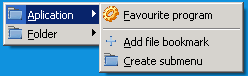
ClickAndStart

ClickAndStart features a simple and intuitive interface and offers an easy way to customize shortcuts to applications. This simple and reliable program allows you to create submenus with the hierarchy you need. Both people who use the mouse and people who use the keyboard will find this program helpful and handy.

ClickAndStart makes it easier to start frequently used applications, making work with frequently used folders quick and easy.

ClickAndStart is designed for people who use the mouse as their main device in their work with the computer, yet those who prefer to use the keyboard are taken into account as well.

If you prefer to use the mouse:

Three mouse clicks are enough to start your favorite program...

1. Press and hold down the left mouse button
2. Press the right mouse button while holding the left mouse button
3. Select your favorite program in the popup menu

If you prefer to use the keyboard to start your favorite program, simply press the correct key combination (you can always change the combination.) In the simplest case, it can be just 2 keys CTRL+W.


Back to ClickAndStart Details page

ClickAndStart Screenshot Related

Application Bookmark Hotkeys Launch
Mouse Opening With Hotkeys Opening With The Mouse Start
Starting With Hotkeys Starting With The Mouse Working With Applications Working With Folders
 

Copyright © 1995-2008 PCWin Download Center. Home | | Privacy | Link to Us | Submit / Update Software