
File Information Editor Screenshot
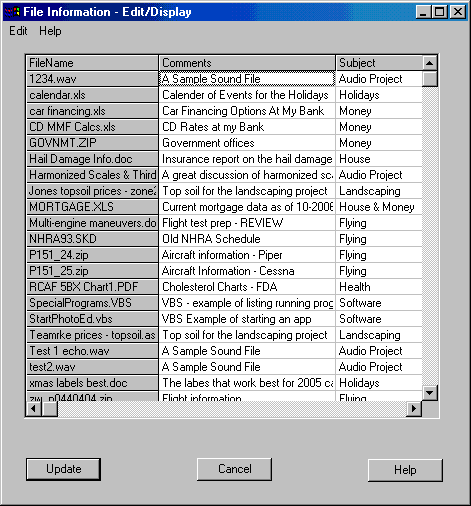
Use File Information Editor enhances to easily update the Comments, Subject, Category etc. fields of any file on your system. These Summary Information Fields have been available in Windows since NT was first introduced but Microsoft has never provided an easy way of using them. The File Information Editor makes updating these fields as easy as using a spreadsheet for any number of files.
You can edit individual values with a double click of the mouse or use any of these editing commands:
• Copy/Cut & Paste a range of cells
• Find /Replace across all cells or a selected range of cells.
• Delete a value by editing and deleting or select a cell and then select Clear
• Clear all values.
When you are done, press the save button and the fields are updated. With the File Information Editor makes it easy to identify the contents of every file without having to have ridiculously long filenames.
Summary Information Editor enhances your security.
You may have a “playful” computer name or a user name on your PC at home. Did you know that if you email someone a copy of your resume all of those fields go along with the file???
Click the “All Read-Write Fields” in the Field Selection Dialog and the select “Clear All” from the spreadsheet dialog to securely remove all writable Summary Information from a file. Better yet, use the File Information Editor to provide useful information to the recipient about the contents of the files.
File Information Editor is part of the CAVU Software Productivity package, a set of utilities and shell extensions that expand your ability to manage the information on your computer. You will be able to install (and uninstall) all of the CAVU products. You can register or uninstall any of the applications.
Half-price as part of the CAVU Productivity Package!
Back to File Information Editor Details page
- Pdf Information Editor
- Songs Information Editor
- Exif Information Editor
- Meta Information Editor Software
- Song Information Editor Software
- Tree File Information
- File Information Decryption
- Pcm File Information
- File Header Information
- Document File Information Reader


