
EzMigration Screenshot
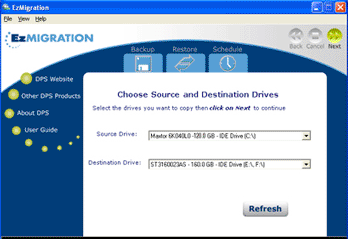
EzMigration takes all the work out of moving to a new or larger boot drive or data drive. There's no need to rebuild a drive or to spend hours reinstalling applications and searching the net for updates and drivers. Migrate everything in one simple drive copy operation. Then expand the drive partition if necessary.
When you migrate a boot drive you cannot simply copy individual files from one drive to another if you want the new drive to be bootable. To create a bootable drive that contains working applications, you need to move all the data as a single drive image. EzMigration drive migration software creates that image copy for you and transfers it to your new drive.
EzMigration gives you the ability to move everything on your drive (including any partitions) in one simple operation. It creates a disk image or drive image, which is essentially a clone of your original, on the new drive. EzMigration does a bit by bit copy, not a file by file copy. When you copy a drive in this way, you are able to migrate not only your data files but your installed applications, preferences and even the partitioning information from your old drive.
Ezmigration software eliminates all the time and effort normally required to set up a new drive. With just a few mouse clicks, the job is done. But migrating your drive contents is only part of what EzMigration can do for you. When you transfer an image copy of your original drive to a new drive, the image creates a partition on the new drive. If your old and new drives are the same size, the partition will occupy all the space on the new one.
However, if your new drive is bigger than your old one, you will end up with a partition the size of your old drive on the new drive and you mayl be left with a lot of empty space on the larger drive that you cannot access. EzMigration's partition expansion tool lets you easily expand the partition and regain that space.
Back to EzMigration Details page


