
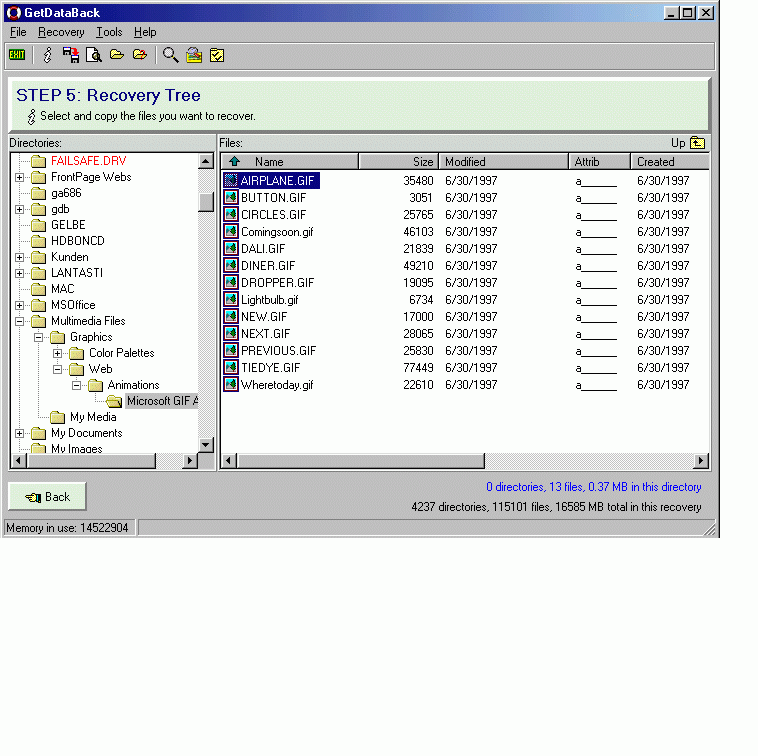
GetDataBack Data Recovery for FAT Screenshot
No matter what the disaster scenario is - GetDataBack will recover your data if the hard drive's partition table, boot record, FAT or root directory are lost or damaged, data was lost due to a virus attack, the drive was formatted, fdisk has been run, a power failure has caused a system crash, files were lost due to a software failure, files were accidentally deleted...
Recover even when Windows doesn't recognize the drive - GetDataBack can even recover your data when the drive is no longer recognized by Windows.
It can likewise be used even if all directory information - not just the root directory- is missing.
Get everything back- Advanced algorithms will make sure that all directories and sub directories are put together as they were, and that long file names are reconstructed correctly.
GetDataBack is safe - GetDataBack is read-only, meaning the program will never attempt to write to the drive you are about to recover. Please make sure to read the safety instructions...
GetDataBack is easy to use - The software enables the regular user to conduct his own data recovery by guiding him through five easy to understand steps, thus gives the advanced user the possibility to interfere with the recovery and improve the results, by examining the scan log, the file system details, file and directory information, by selecting the sector range to be scanned, by choosing excessive search for file systems or search for lost files, by calling Runtime's DiskExplorer. Recover files over your local network or over a serial cable.
This feature enables you to run GetDataBack on one computer ("remote") while accessing the drives of another computer ("host").
Recovering data over a network is useful, especially when you are not able to remove the drive you want to recover from and attach it to another computer.
GetDataBack can also be run from a boot disk and now supports Unicode characters.
Back to GetDataBack Data Recovery for FAT Details page
- Getdataback Data Recovery
- Full Getdataback Data Recovery
- Getdataback Data Recovery Full
- Getdataback For Fat
- Getdataback Fat
- Getdataback For Fat Full
- Data Doctor Recovery Fat
- Raid Data Recovery Fat
- Fat Corrupted Data Recovery
- Recovery Data Fat Ntfs


