
Install Unattended Pro Screenshot
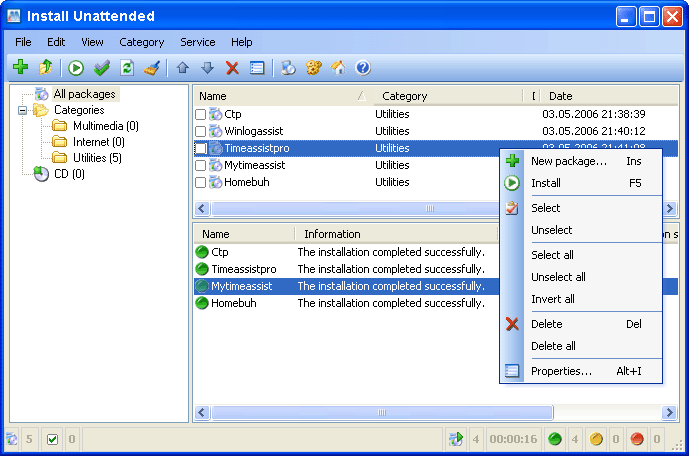
Install Unattended Pro is created to free you from routine work such as program installations. All you have to do is to install the application only once on your master PC and Install Unattended will record all your actions. By using Install Unattended Pro, you will not have to write a single line of code or script! Install Unattended will install all the applications you need automatically, either on your original computer or on a new one, it's ideal for rebuilding your systems quickly!
Uninstall Happens when you press Enter, select Uninstall command from Action menu or from context menu on a selected item in the list. It just executes the uninstall command defined in the registry. Sometimes uninstallers do not delete entries from the registry. In this case you can use the Delete command
Delete This action simply delete the entry from registry (not from disk!) not to annoy you. Be carefull while doing it - be sure that this program has been deleted from the disk physically. The action can't be reversed (will be in future versions!).
Jump to registry Opens regedit.exe and jumps to the correspondent branch in the registry. Be carefull when editing registry, this may cause many problems. This feature is only for experts!
Jump to installation folder Opens explorer.exe and jumps to the folder where the program is installed
Jump to web site Opens your default browser with the selected program's home page
Save Save the list with all details to a HTML file on a disk. Great option, you can print the file afterwards
Hidden items Toggles display of hidden programs. In most cases they can't ve uninstalled, but it's not recommended to delete them
Display updates Toggles display of Windows updates. In most cases you don't need to see them at all, so this option is off by default
Windows components Display windows standart dialog for adding/removing windows components
Back to Install Unattended Pro Details page
- Unattended Install
- Install Unattended
- Install Unattended Expert
- Install Unattended Enterprise
- Unattended Win Install
- Install Excel Unattended
- Nstall Unattended Pro
- Install Us Pro
- Install Creator Pro
- Install Vnc Pro


