
Meta Commander Pro Screenshot
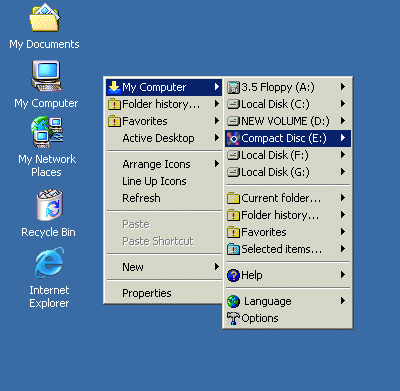
Meta Commander Pro is the unique file utility that has some exclusive features, never seen in file management software before! It is built around single-click technology, ensuring you can access any file or folder on your computer, copy-move files and folders, run popular applications as well as your preferred programs with just ONE click!
Meta Commander can help you browse disk contents presenting it as a hierarchical menu with files and folders displayed as sub-menus. When using Explorer, MS-Office, Total Commander or Far, it takes at least 6 mouse clicks to access a level-three folder. With Meta Commander you will only need to click once! How about that? This rocking feature allows you do all kinds of things with one click - from opening documents and running applications to browsing the web!
Meta Commander Pro operates as a shell enhancement. It builds itself into context menu available on right-click. You will notice "My Computer" item appear in you context menu after installing this software. Once you see it, you can perform a variety of actions depending on object selected when right-clicking. One thing that is constant is that you only need ONE click to do anything!
Back to Meta Commander Pro Details page
- Meta Commander Pro File Utility
- Meta Commander
- Meta Stock Pro
- Meta Offline Pro Eksplorer Bedava Indir
- Commander Pro
- Password Commander Pro
- Newsgroup Commander Pro
- FTP Commander Pro
- Plugin Commander Pro
- Mail Commander Pro


