
PCWin Software Download Center
 
Product Home
Download Trial
Purchase
Author Site

Category

 
Audio
Business & Finance
Desktop Enhancements
DVD & Video
Games
Home & Education
Internet
Multimedia & Design
Security & Privacy
Software Development
Utilities
Antivirus
Backup
Command Line Utilities
Desktop Enhancements
Device Drivers
File & Disk Management
File Compression
Font Tools
Icon Tools
Launchers
Misc. Utilities
Network
Optimizers & Diagnostics
Printers
QuickLaunch Utilities
Screensavers
Security & Encryption
Shell Extensions
System Surveillance
System Utilities
Uninstallers
Web Authoring


Popular Downloads

 
Internet Download Manager
TubeHunter Ultra
EasySystemCleaner
Majestic Waterfalls Screensaver
Visual Renamer
Aurora Web Editor 2007 Professional
MySpeed PC Lite
eScan Pro Edition
More than 30.000 vista icons
HelpVistaXPDiamond
 

New Downloads

 
SharePoint RichText Boost
Elecard Converter Studio
PhotoLab Calendar
4Leaf AVI Video Splitter
VisiFly
File Smitter
Serial Port Redirector
Windows Password Reset
Easy Card Creator Enterprise
Pro Cleaner
 

Related Downloads

 
Program File Launcher
Application Launcher
File Launcher
Launcher.Dll
Sdm Launcher
Launcher Plus
Hl Launcher
Cd Launcher
Launcher Dll
Hotkey Launcher
 

MouseLaunch Screenshot
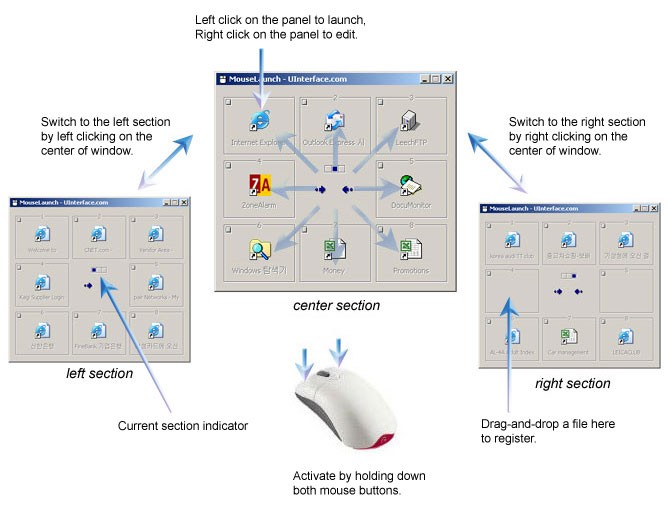
MouseLaunch is a quickest program launcher that is activated by one mouse gesture. MouseLaunch uses a built-in unique technology of detecting both mouse button pressing and it enables the complete new user interface of using mouse and launching programs.

You can activate the launcher by holding down both mouse buttons at any location in Windows. Once the launcher activated, move the mouse cursor a little to the registered program/file (eight-direction) and click to launch. Once you experienced, it will takes less than 1 second for entire action. MouseLaunch has 3 sections (center, left, right) and each section contains 8 panels for program/file registering. With SHIFT key combination, you can register programs/files up to 48.

MouseLaunch supports a drag-and-drop to register your favorite application programs and files to the launcher panels. You can drag and drop a file from desktop area, Start menu, Quick Launch, Windows Explorer and even from favorities in the Internet Explorer.

MouseLaunch also supports two special panels - Emailer, Text Clipboard - for fast emailing and copying text to the clipboard.

In this version, Windows Vista compatibility added.


Back to MouseLaunch Details page

MouseLaunch Screenshot Related

Application Launcher Application Program Launcher File Launcher Program File Launcher
Program Launcher
 

Copyright © 1995-2008 PCWin Download Center. Home | | Privacy | Link to Us | Submit / Update Software