
OsaSync Lite Screenshot
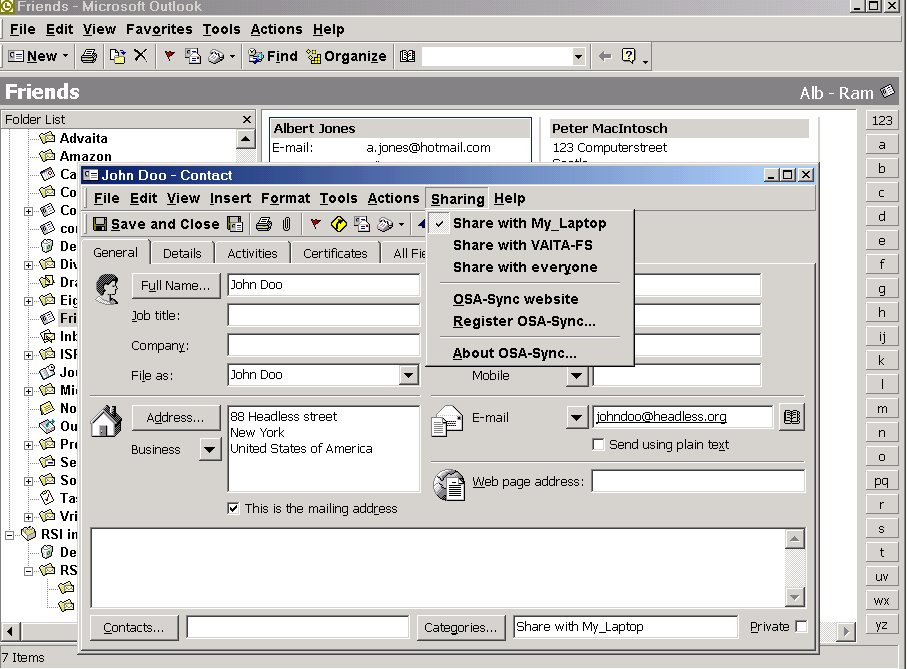
With OsaSync Lite you can share and/or synchronize Microsoft Outlook 2000/2002/2003 contacts on your local network or VPN. Use OsaSync Lite when you want to:
a} Share some common contacts in your contacts folder with your family members.
b) Synchronize your Outlook folders on your laptop with your desktop.
c) Collaboratie with others. Save your customers in a COMMON CONTACTS FOLDER
Share you Outlook contacts with one, two or three other computers on your network. Every change you make to a shared contact is automatically reflected in the contact on the other computer(s). Just select the contacts you want to share like your mutual friends or colleagues, click ‘share’ and these contacts will appear in the contact folder on the other computer(s).
OsaSync Lite also enables you to synchronize all contacts between a maximum of 4 computers. Synchronization happens fully automatically, no action by you is required. Just connecting your computer to the network (for instance in case of a laptop) and starting Outlook is enough to have OsaSync process all the changes.
OsaSync Lite is very easy to install and configure, the OsaSync connection wizard will guide you through the configuration steps. No need to be a wizzkid to get OsaSync running!
OsaSync Lite supports the use of PDA's or cell phones.
OsaSync Lite is freeware
Back to OsaSync Lite Details page
- Droid Lite Flashdroid Lite Flash Free
- Cheat Na Country Life Lite Lite
- Droid Lite Flashdroid Lite Flash
- Tether Lite Connect Lite
- X Lite.com
- X Lite Com
- Pagekeeper Lite
- P Encryption Lite
- Ds Lite Crosswords
- Promob Lite


