
Password Assistant Screenshot
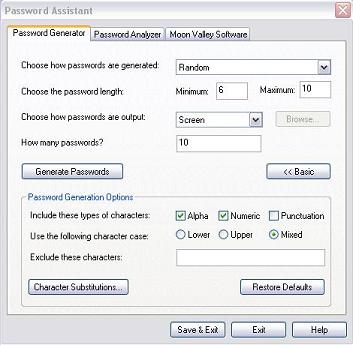
Password Assistant a complete solution to check your current passwords & generate new, strong passwords. Whether your computer use is at home or in a small company or large corporation, Password Assistant is an important tool for today’s security requirements and privacy policies. Password Assistant gives you a variety of options that helps you to meet and exceed corporate, government or mandated password strength requirements.
New, strong Passwords are generated that are very difficult to break. Numerous options assist you in generating passwords that are easier for you to memorize featuring; Dictionary based and Pronounceable passwords in addition to Random word types. Use optional settings for variable password length, use of character types Alpha (Letters), Numeric (Numbers), Punctuation (! , ? . + etc.). Mix it up with case variations; all upper case, (Capital letters), lower case, (small letters) or mixed case, (Both upper and lower case).
Use character exclusions and substitutions to avoid common password flaws and trip up brute force attempts to break a password. With character substitution you specify characters that will replace others and are easily entered and maintained to periodically alter your mix.
When you’ve completed your password options and settings, output your passwords to the ClipBoard for convenient cut and paste use, a File for later use and screen to preview the results of your selections. Easily Save your settings and options or restore setting to defaults to start over.
The Password Analyzer helps you determine if you have a secure password. Type in your password and see a brief assessment on the strength and efficacy of your password Should your password be ineffective, you will see a brief recommendation on what changes are recommended to strengthen your password. See analysis and estimates on the number of computer cycles and how long a computer will take to break your password.
Back to Password Assistant Details page
- Assistant Word
- Assistant Operate
- Assistant Explain
- Assistant Operator
- Assistant Email
- Assistant Typist
- Assistant Software
- Assistant Seo
- Assistant Pro
- Assistant Share Network


