
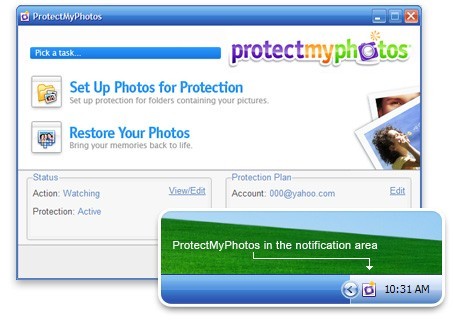
ProtectMyPhotos Screenshot
Finally! A foolproof way to protect your photos!
ProtectMyPhotos is a small application that automatically backs up all of your memories over the Internet.
ProtectMyPhotos helps you:
* Automatically back up all of your photos to our secure data center.
* Access your protected photos from anywhere with our online viewer.
* If something bad happens, quickly and easily restore all of your photos.
* ProtectMyPhotos shields your digital photos from hard drive crashes, viruses, and file corruption.
Easy 1-Time Setup.
After you install the software, ProtectMyPhotos provides you with the option to backup all the photos on your computer, or to choose specific folders that you would like to protect. Once you have completed the 1-time setup process, the application runs quietly in the background (minimized in the notification area).
Automatic and Hassle-Free Backup.
After you’ve finished the initial backup of your photos, ProtectMyPhotos will continue to monitor your folders watching for changes. If you make changes to a photo (e.g. - rotate, crop, brighten, etc.), the modified file(s) will be instantly and automatically uploaded. This all happens silently, in the background.
Access Anytime, Anywhere.
Access your protected photos from anywhere with our online viewer. View all of the photos on your computer conveniently from just about any modern web browser. The best part is - your home computer does not need to stay on to view your protected photos!
If Something Bad Happens - Relax.
Your hard drive grinds to a halt. Relax, we’ve got you covered! With just a few clicks, you can begin automatically restoring all of your precious photos from the Web back to your computer. All of your folder and file names are restored exactly as you left them.
ProtectMyPhotos has built its entire business on the concept of doing whatever it takes to ensure that your data is safe. We go to great lengths keep your photos protected.
Back to ProtectMyPhotos Details page


