PCWin Software Download Center
 
Product Home
Download Trial
Purchase
Author Site

Category

 
Audio
Business & Finance
Desktop Enhancements
DVD & Video
Games
Home & Education
Internet
Multimedia & Design
Security & Privacy
Software Development
Utilities
Antivirus
Backup
Command Line Utilities
Desktop Enhancements
Device Drivers
File & Disk Management
File Compression
Font Tools
Icon Tools
Launchers
Misc. Utilities
Network
Optimizers & Diagnostics
Printers
QuickLaunch Utilities
Screensavers
Security & Encryption
Shell Extensions
System Surveillance
System Utilities
Uninstallers
Web Authoring


Popular Downloads

 
Internet Download Manager
TubeHunter Ultra
EasySystemCleaner
Majestic Waterfalls Screensaver
Visual Renamer
Aurora Web Editor 2007 Professional
MySpeed PC Lite
eScan Pro Edition
More than 30.000 vista icons
HelpVistaXPDiamond
 

New Downloads

 
SharePoint RichText Boost
Elecard Converter Studio
PhotoLab Calendar
4Leaf AVI Video Splitter
VisiFly
File Smitter
Serial Port Redirector
Windows Password Reset
Easy Card Creator Enterprise
Pro Cleaner
 

Related Downloads

 
Application Launcher
Business Launch
Business Fax Application
Search Launcher
Program File Launcher
Program Launch
Application Monitor
Monitor Application
Program Start
Vb Skin Program
 

Cresotech Easystart Screenshot
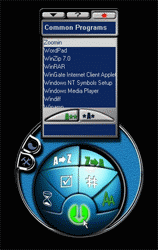
CRESOTECH EASYSTART is a tray-based skinnable tool to easily manage, locate, start and monitor any program on your computer. No matter how powerful is your PC, with dozens of programs stored it becomes a nuisance and loss of time to find and start the one that you need right now. Hair-of-the dog solution is to install one more program to do this job: a compact skinnable tool CRESOTECH EASYSTART is recommended. This powerful tool is really an easy way to locate, start and monitor any program on your computer with indication of the general time of its use, frequency of its access and other details. Its powerful context search engine allows you to locate any program, form the list of programs and service files on your computer, sort them by name, time of work, last access time or launch number - just type in some letters from program name to the wildcard list and give some seconds to EasyStart to collect the data on all file groups (like Desktop, Start Menu, etc.) and detect any changes for you automatically. For further convenience you may create your own custom groups of favourite programs. EASYSTART will help you in doing this, just give it a try and soon it will be included in these!


Back to Cresotech Easystart Details page

Cresotech Easystart Screenshot Related

Application Business C Cresotech
Easystart Find Launch Launcher
Locate Manager Monitor Program
Run Search Skin Skins
Start Stats Utility Utilties
 

Copyright © 1995-2008 PCWin Download Center. Home | | Privacy | Link to Us | Submit / Update Software