
SIGuardian Screenshot
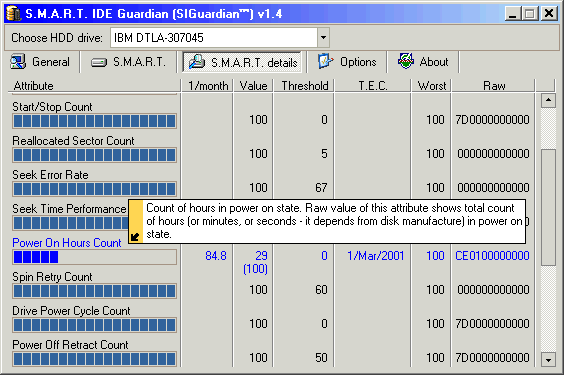
Learn about HDD failure BEFORE it happens and save your valuable data. SIGuardian uses S.M.A.R.T technology built in every modern hard-drive to accurately predict the date when using a particular hard-drive is no longer safe. S.M.A.R.T. stands for Self-Monitoring, Analysis and Reporting Technology. Every time the hard-drive is started, it performs a self-checkup and records a certain value for each of its attributes (properties). The values range between 0 (non-functioning) to 250 (excellent condition). The average value for most attributes is 100. When the safety threshold is crossed (20 for most attributes), it means that a hard-drive is unstable and you should back up your data. SIGuardian displays all HDD attribute values, whether they are safe and not, real-time. This tool is also capable of monitoring HDD temperature and alerting you over the network or via e-mail when overheating or failure possibility is diagnosed. You donlt have to monitor HDD condition l the program can do it itself. The program works in two modes. The first one is attribute check upon startup. In this mode, the program compares previous attribute values to the new ones and, if the are unchanged, automatically closes itself. Likewise, if SIGuardian discovers that some attribute value is lower, you will be alerted. In the second mode, this software application is continuously running and checks for the attribute values periodically according to the user specified intervals. While the program is simple and straightforward enough to be used by any computer user at home or office, SIGuardian comes with special features that make it an ideal tool for monitoring multiple hard-drives. The program is very easy to deploy over networks of any size. In addition, SIGuardian is capable of supplying other HDD information, such as standards supported, speed modes, current working mode, to name a few. Download your FREE trial version and never worry about HDD failures again.
Back to SIGuardian Details page


