
Send To Toys Screenshot
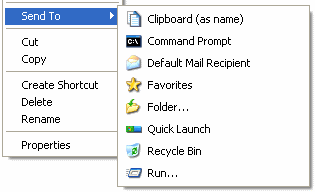
Send To Toys is an enhancement of the Send To system menu.
- Send To Toys Control Panel Applet allows you to manage the Send To system menu content, and configure the various Send To Toys settings.
- "Add to Send To menu" and "Remove from Send To menu" allows you to personalize the Send To system menu for drives, folders, and programs.
- Send To "Clipboard (as name)" copies the name of the file or files to the clipboard. Hold down the CTRL key to change the settings for this extension.
- Send To "Clipboard" command line utility copies the output of a command to the clipboard. Type SENDTOCLIP /? at the command prompt for more information.
- Send To "Command Prompt" opens a DOS console window, setting the current directory to the selected folder. If the selection was a file, the folder containing the file will be the active directory and the name of the file will be typed for you at the prompt. Hold down the CTRL key to change the active directory to a different folder. Hold down the SHIFT key to force the use of the COMMAND.COM regardless of the Windows version.
- Send To "Default Mail Recipient" creates a new e-mail with attachments and predefined defaults for the recipients, subject, and message. Hold down the CTRL key to change the settings for this extension.
- Send To "Favorites" adds a shortcut to your Favorites list. Hold down the CTRL key for the "Add Favorite" dialog.
- Send To "Folder..." sends a file or files to another folder, you will be shown a dialog box that lets you choose where the files should be copied, moved, or have a shortcut created. To move the files press and hold down the SHIFT key. To create a shortcut hodl down the SHIFT and CTRL keys.
- Send To "Quick Launch" adds a shortcut to the Quick Launch toolbar.
- Send To "Recycle Bin" sends a file or files to the Recycle Bin. Hold down the CTRL key to perform a file shredding.
- Send To "Run..." sends a file or files to the Run command dialog.
Back to Send To Toys Details page
- Iphone Auto Send Send Sms
- Virtual Toys
- Paltalk Toys
- Toys And Trees
- Marbles Toys
- Ms Power Toys
- Desktop Toys
- Pc Desktop Toys
- Screen Toys
- Toys Story


