
System Tracker Screenshot
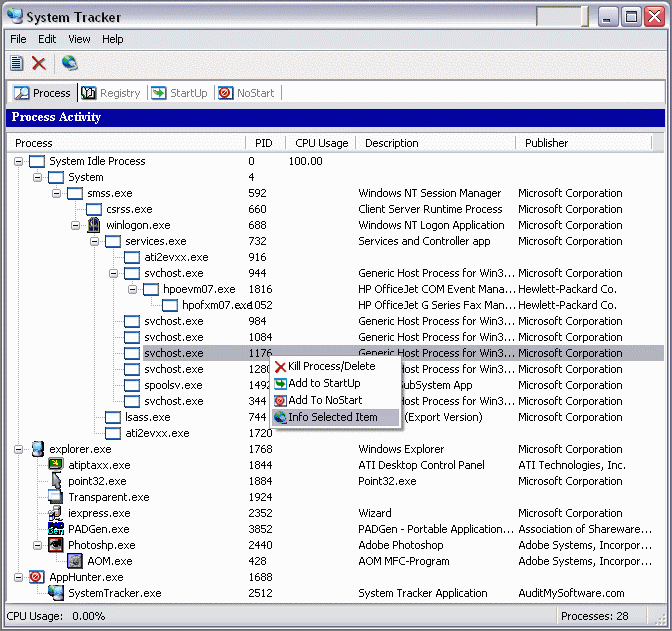
System Tracker is a powerful, full-featured utility that audits the programs running on your machine and provides the user complete control over active processes on the computer. Detailed information about processes you may find is available from our online database and is conveniently accessed with a right click on any process. Basically it describes the files you may have found and explains what they do, therefore enabling the user to make an informed decision when determining if the process is desirable. System Tracker has a single document interface. One window opens to present the user with four tabs that offer distinct capabilities to deal with different aspects of the computer. The Process tab displays and enables control of all processes(programs) currently active on the computer and provides basic details. A Registry tab shows the user what programs are currently accessing the Windows registry and describes the actions being taken. Our StartUp tab provides the user with control over what processes are set to automatically start and view from which of various locations they are set. For persistent applications users can use the NoStart tab to effectively disable selected processes from running on the machine, regardless of location. See our online help files for a complete set of options available for each tab. You will find the tabs resourceful and intuitively simple to use. Other utilities are available that perform similar tasks for a premium cost, but we offer all these features in one package and are giving it away for free. The System Tracker program, the online resources, and all future releases are provided to you by www.auditmysoftware.com free of charge. Whether using it to track down system resource traps that create performance anomalies, or just to learn more about what is happening behind the scenes on your computer, we think you will enjoy System Tracker. Once you try our auditing software you will see there is no need to give your money away.
Back to System Tracker Details page
- Trane Tracker Stat System
- Time Tracker System Tray
- Adsense Earning System Tray Tracker
- Time Tracker System Tray Multiuser
- Request Tracker Online Call Tracker
- Software Event Tracker Version Tracker
- Issue Tracker Time Tracker Merge
- Mouse Activity Tracker Tracker
- Myspace Tracker Viewer Tracker
- System Software Notes File System Model


