
PCWin Free Downloads Center
 
Product Home
Download Trial
Purchase
Author Site

Category

 
Audio
Business & Finance
Desktop Enhancements
Cursors
Font Tools
Fonts
Icon Tools
Icons
Misc. Themes
Movie Themes
Music Themes
Screensavers
Shell & Desktop Managers
Skins
Sports Themes
Start-up/Shutdown
TV Themes
Wallpaper
DVD & Video
Games
Home & Education
Internet
Multimedia & Design
Security & Privacy
Software Development
Utilities
Web Authoring


Popular Downloads

 
More than 30.000 vista icons
TubeHunter Ultra
EasySystemCleaner
Aurora Web Editor 2007 Professional
Help Explorer Viewer for Windows
MySpeed PC Lite
eScan Pro Edition
HelpVistaXPDiamond
WAB-Processor
Win Guard Pro
 

New Downloads

 
Visual Importer
Aiseesoft MP4 Converter for Mac
Smart cleaner
Tipard iPhone Converter Suite for Mac
USB Stick Watcher
IBillIt for AIM & ARB
OrgScheduler
Contenta NEF Converter
AutoTRAX Design Express
4Easysoft Mac iPod touch Video Converter
 

Related Downloads

 
Multi Dvd Menu
System Menu
Transparency Window
Window Transparency
Transparent Window
Minimize To Tray
Tray Minimize
Stay On Top Window
Multi Window Ie
Multi Tray
 

Popular Searches

 
Limewire Old Version
Red Tube Video Downloader
Redtube Video Downloader
Network Administrator Download
Icons Xp Free
Crash Icons Screensaver
ANti Network Download
Avi Drivers
Network Speed Test
Killer Download On Network
 

Actual Window Menu

Actual Window Menu 5.4

Actual Windows Menu is a suite of the most essential tools for versatile windows control: minimize them to tray, set up priority, keep always-on-top, apply transparency, etc. Once installed, the extra options are added to each window's system menu. Download Actual Window Menu by Actual Tools
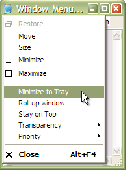
Screenshot of Actual Window Menu
Language: English, German, French, Spanish, Russian, Japanese, Chinesesimplified, Chinesetraditional, Polish, Portuguese, Dutch, Ukrainian
Publisher: Actual Tools
License: Shareware
Price: USD $19.95
Filesize: 3.6 MB
Date Added: 09/01/2009

Actual Window Menu is a suite of the most popular innovative tools letting users operate windows on the desktop in some advanced ways: alternatively minimize to Windows notification area (system tray) or to a floating icon on the screen, alter the execution priority of Windows processes on-the-fly, apply semi-transparency effect, roll up/unroll, resize, align, easily move windows between different displays in a multiple display environment, etc.
Installation, as well as the use of the program, is extremely easy and does not require much time. After installation, the application embeds its extra commands into each window's system menu. These new commands are as easy to use as common Move/Size/Minimize/Close ones, and they significantly enhance windows management abilities. The set of commands can be customized for particular applications so that you can select just features which are really necessary there and, thus, form a convenient and flexible working environment.
Actual Window Menu is irreplaceable when you have to work with numerous applications at once switching from one to another, which is very annoying and frustrating. Moreover, it becomes quite difficult to distinguish between minimized programs as they get the taskbar piled up. Actual Window Menu enables you to forget that chaos and proceed with your work not being disturbed by windows mess on the desktop. System window menu is the standard windows management facility - it's simple, handy and functional. Enhancing it with Actual Window Menu will turn it into a magic wand - powerful and unobtrusive.

PCWin Note: Actual Window Menu 5.4 download version indexed from servers all over the world. There are inherent dangers in the use of any software available for download on the Internet. PCWin free download center makes no representations as to the content of Actual Window Menu version/build 5.4 is accurate, complete, virus free or do not infringe the rights of any third party. PCWin has not developed this software Actual Window Menu and in no way responsible for the use of the software and any damage done to your systems. You are solely responsible for adequate protection and backup of the data and equipment used in connection with using software Actual Window Menu.

Rating: 5 Stars

Platform: Windows 2000, Windows 2003, Windows XP, Windows Vista

Category: Desktop Enhancements / Shell & Desktop Managers


Download | Homepage | Buy Now | Screenshot | Report Error

Related Software

Minimize Multi-monitor Priority Roll Up
Run Stay Always On Top System Menu Translucent
Transparency Transparent Tray Unroll
Window Menu


eXtra Buttons - eXtra Buttons is shareware software that presents 9 buttons in windows captions.
Auto Window Manager - Auto Window Manager resize your programs automatically, such as maximize, minimize, normal, minimize to tray. It also set application windows transparency, minimize them to tray, keep them stay on top, automatic refresh for Internet Explorer.
Actual Title Buttons - Actual Title Buttons is a suite of the most essential tools added to the title bars of windows once installed, with many exciting functions for windows control: minimize them to tray, set up priority, apply transparency, keep always-on-top, and more!
Actual Window Decorations - Make windows easy to use and beautiful! Add handy new buttons to any window title bar: "Minimize to Tray," "Stay on Top" and "Make Transparent." Minimize windows to the Tray or roll them up into a title bar instead of an icon. Keep important...
Actual Handy Windows - Make windows handier and easier to use! Add new Rollup/Unroll, Minimize to Tray, Stay on Top buttons to any window title bar near the standard buttons. Minimize windows to Tray or to any screen edge. Roll them up into a title bar instead of an...
Actual Window Manager - Actual Window Manager is a suite of over 50 innovative tools, letting users change their interaction with windows in many new exciting ways: minimize windows to tray or to an icon on the desktop, apply transparency, roll up, pin on top, resize, etc.
XNeat Windows Manager - XNeat is taskbar utility in the must have list. XNeat gives you full control over your Windows by extending it's features: 1) Stay On Top 2) Show / Hide Windows 3) Taskbar Utility 3) & More Once you try it, you will love it .. !
AllToTray - AllToTray allows you to minimize ANY window to your System Tray.
TransWin - TransWin is a tiny yet powerful tool to help you to set any or all of the windows on your desktop to be transparent. You can set any window to be transparent, even can set the Start Menu and the task bar to be transparent.
TweakWindow - TweakWindow is a handy window enhancement utility with a wealth of options. You can set your own transparency options, hide, minimize, roll up, place window on top of all others, ghost it or even change a window's icon/title. Try it FREE now!

More Software of "Actual Tools"

Actual Title Buttons - Actual Title Buttons is a suite of the most essential tools added to the title bars of windows once installed, with many exciting functions for windows control: minimize them to tray, set up priority, apply transparency, keep always-on-top, and more!
Actual Handy Windows - Make windows handier and easier to use! Add new Rollup/Unroll, Minimize to Tray, Stay on Top buttons to any window title bar near the standard buttons. Minimize windows to Tray or to any screen edge. Roll them up into a title bar instead of an...
Actual Window Decorations - Make windows easy to use and beautiful! Add handy new buttons to any window title bar: "Minimize to Tray," "Stay on Top" and "Make Transparent." Minimize windows to the Tray or roll them up into a title bar instead of an icon. Keep important...
Actual Windows Manager - This advanced software adds extra functionality to every window on the system. It allows you to roll-up and unroll windows, hide them to Tray, keep them on top and make them semi-transparent via new title bar buttons. Download FREE trial version now!
Actual Window Rollup - Actual Window Rollup opens new opportunities for efficient window management. It allows you to roll up window's contents in a single click or keystroke, so that you can get quick access to underlying information. It works for all types of windows.
Actual Windows Guard - Actual Windows Guard will help you automatically minimize certain programs upon startup or open them full screen. It will help you get rid of annoying pop-up windows. It will also allow you to discipline unruly windows and put your desktop in order
Actual Transparent Window - Actual Transparent Window offers new ways of working with multiple windows: it lets you easily set and vary transparency level of any window, either manually via title button or automatically depending on a window state (active/inactive/moved/etc.).
Actual Window Guard - Actual Window Guard allows keeping all types of windows on the desktop in the size and position you prefer. By means of various rules, the tool helps to organize your workspace in many ways, therefore making your work more comfortable and efficient.
Actual Window Manager - Actual Window Manager is a suite of over 50 innovative tools, letting users change their interaction with windows in many new exciting ways: minimize windows to tray or to an icon on the desktop, apply transparency, roll up, pin on top, resize, etc.
Actual Window Minimizer - Use Actual Window Minimizer for more practical and effortless window management. The tool offers various ways of manual and automatic window minimization to the system tray or any desktop spot. Avoid taskbar clutter - minimize your windows anywhere!
 

Copyright © 1995-2009 PCWin Free Downloads Center. Home | Archive | | Privacy | Link to Us | Submit / Update Software