
PCWin Software Download Center
 
Product Home
Download Trial
Author Site

Category

 
Audio
Business & Finance
Desktop Enhancements
DVD & Video
Games
Home & Education
Internet
Multimedia & Design
Security & Privacy
Software Development
Utilities
Antivirus
Backup
Command Line Utilities
Desktop Enhancements
Device Drivers
File & Disk Management
File Compression
Font Tools
Icon Tools
Launchers
Misc. Utilities
Network
Optimizers & Diagnostics
Printers
QuickLaunch Utilities
Screensavers
Security & Encryption
Shell Extensions
System Surveillance
System Utilities
Uninstallers
Web Authoring


Popular Downloads

 
Internet Download Manager
TubeHunter Ultra
EasySystemCleaner
Majestic Waterfalls Screensaver
More than 30.000 vista icons
Visual Renamer
Aurora Web Editor 2007 Professional
MySpeed PC Lite
eScan Pro Edition
HelpVistaXPDiamond
 

New Downloads

 
CapTrue
Froddle Pod
Audio Recorder Titanium
StatPlus Portable
Apen FLAC Ripper
Jesterware DVD to Apple TV
BluEasy
Perspector Lists
Auto Collage Studio
EazyCode
 

Related Downloads

 
Caps Lock Tray
Caps Lock Sound
Windows Logo
Windows Logo Key
Windows Lock
Lock Windows
Ip Lock Windows
Wmv Screen Caps
Xp Screen Lock
Lock Screen
 

I Hate This Key Deluxe Edition

I Hate This Key Deluxe Edition 4.0

This handy utility sits in the system tray and allows you to control special key behavior. You can easily protect yourself from pressing unwanted key combinations. "Doubleclick" and "Press and hold" modes, sound notifications and more... Download I Hate This Key Deluxe Edition by ByteGems.com Software
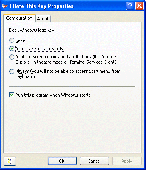
Screenshot of I Hate This Key Deluxe Edition
Publisher: ByteGems.com Software
License: Shareware
Price: USD $9.95
Filesize: 681.7 KB
Date Added: 07/06/2007

One day I came into our office and found that a keyboard on the table of one of our leading developers was broken. Several buttons were missing. Horrible black gaps where keys used to be. We all were astonished. Who would commit this foolish crime? Soon, Mike, the keyboard owner, appeared and explained that he had broken the keyboard himself. The previous evening, he had lost a significant portion of his code by pressing one of the extended keys accidentally. After that, he got a screwdriver and picked out all the extended keys!

Thrilled with Mike's case, we decided to study less radical opportunities to solve this problem. Virtually all modern keyboards come with a set of extended keys: a pair of Windows Logo Keys and power control keys. Multimedia keys are normally hard to be pressed accidentally. They are small and located relatively far from the standard keys. The most dangerous extended keys are located within the standard key areas. These are Windows Logo keys, Caps and Num Locks, Insert and Power Control keys. You can easily touch them when typing or when playing games. Pressed in combination with other buttons, they can cause unpredictable effects.

The most versatile and flexible software solution that we've found is called "I Hate This Key" (did they know Mike's story?) This handy utility sits in the system tray and allows you to control special key behavior. You can either disarm the Windows Logo keys completely or in full-screen applications only, e.g. in games. The program lets you make your Caps and Num Lock buttons safer. No need to disable them completely. You can choose from "Doubleclick" or "Click and hold" modes. This is especially important for wireless keyboards that have no Caps and Num Lock indicators. "Insert" can be automatically disabled in text editors, yet, it can continue to function in combinations (Ctrl+Ins, Shift+Ins etc.) Power Keys and F-Lock can be configured as well.

Platform: Windows 2000, Windows XP, Windows 2003

Category: Utilities


Download | Homepage | Screenshot | Report Error

Related Software

3d Action Caps Caps Lock
Full Full Screen Game Key
Keyboard Lock Logo Num
Num Lock Power Power Key Screen
Sleep Sleep Key Windows Windows Logo
sMaRTcaPs - sMaRTcaPs controls the response of the Caps Lock, Num Lock, and Insert key so that each must be purposely held before it will toggle. Unique sounds when each key's changes state, visual indicators, and startup settings. Now with BeepKeys.
Keyboard LED Control - Keyboard LED Control is a tool to control LED of the Numlock, Caps Lock, and Scroll Lock indicator lights on the keyboard, which can be controlled in the Numlock, Capslock, and Scroll Lock key state of being always on, always off or flash.
Desktop Lock - It can lock all items with your computer,just like Mouse, Keyboard, Desktop etc. after your desktop was locked by the software, none can modify your document, access your computer or use programs on your computer.
Password Protected Lock - Password Protected Lock is an excellent security computer lock you can use to secure your PC and protect your privacy. It is attractive, secure, and very easy to use. It starts automatically with Windows and optionally activates desktop lock...
Lower Case Switcher - Lower Case Switcher is a simple, but very useful utility that allows you to correct UPPER and lower case typos, that can occur if you accidentally left the Caps Lock button turned on.
Keyset - Startup Function keys intializer. Some softwares require setting of function keys prior to use. KeySet negates this requirement by setting any of the following keys ON at startup: numlock, caps lock, scroll lock, insert. Works in all vers Windows. Do
Logo Design Studio - Create a professional logo in minutes for websites, documents, personal print jobs and professional print shops. Trademark and copyright your logo design with help from Logo Design Studio.
Company Logo Designer - Designing your company logo yourself is easy. The Company Logo Designer makes it incredibly easy. You just have to click on what you like. No graphical talent needed. Try it!
Mouse Lock - Lock your mouse and PC.
cAPSlOCKhATER - cAPSlOCKhATER turns off the CAPSLOCK key which makes you write EVERYTHING IN CAPS. This stupid key always annoyed me when I was writing e-mails and suddenly all was IN CAPS. This program file tweaks windows to stop this behaviour.

More Software of "ByteGems.com Software"

Scam Sensor for Outlook - Scam Sensor is a Microsoft Office Outlook add-in that examines every e-mail message you read and notifies you if the message is a phishing scam. Download and install this program to protect yourself, your family and your business from e-mail scams.
Display Resolution Manager - Disputing display resolution and brightness options with your colleagues or kids? Stop the squabbles with this program! This is a utility that allows multiple users sharing a computer to set their own display resolution, gamma,brigtness and contrast.
QuickFolders - Still wasting your time while browsing through the millions of folders when trying to attach in Outlook a file that was saved with Photoshop?! Save your time with this program! It will help when you work with the same documents in different programs!
 

Copyright © 1995-2008 PCWin Download Center. Home | | Privacy | Link to Us | Submit / Update Software