
PCWin Software Download Center
 
Product Home
Download Trial
Purchase
Author Site

Category

 
Audio
Business & Finance
Desktop Enhancements
DVD & Video
Games
Home & Education
Internet
Multimedia & Design
Security & Privacy
Software Development
Utilities
Antivirus
Backup
Command Line Utilities
Desktop Enhancements
Device Drivers
File & Disk Management
File Compression
Font Tools
Icon Tools
Launchers
Misc. Utilities
Network
Optimizers & Diagnostics
Printers
QuickLaunch Utilities
Screensavers
Security & Encryption
Shell Extensions
System Surveillance
System Utilities
Uninstallers
Web Authoring


Popular Downloads

 
Internet Download Manager
TubeHunter Ultra
EasySystemCleaner
Majestic Waterfalls Screensaver
Visual Renamer
Aurora Web Editor 2007 Professional
MySpeed PC Lite
eScan Pro Edition
More than 30.000 vista icons
HelpVistaXPDiamond
 

New Downloads

 
SharePoint RichText Boost
Elecard Converter Studio
PhotoLab Calendar
4Leaf AVI Video Splitter
VisiFly
File Smitter
Serial Port Redirector
Windows Password Reset
Easy Card Creator Enterprise
Pro Cleaner
 

Related Downloads

 
Browse Folder
Change Shell Icon
Folder Change
Change Folder
Change Folder Icon
Change Folder Date
Change Folder Case
Shell Context Menu
Folder Browser
Explorer Menu
 

Meta Commander Pro file manager

Meta Commander Pro file manager 1.2.19

A smart pop-up menu containing all your disks, folders and files. It can be called from anywhere you need it. Extremely easy-to-use, very customizable, Meta Commander greatly boosts the speed of your file browsing. Download Meta Commander Pro file manager by Desktop Boosters Software
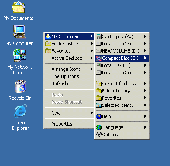
Screenshot of Meta Commander Pro file manager
Publisher: Desktop Boosters Software
License: Shareware
Price: USD $19.90
Filesize: 859.6 KB
Date Added: 07/12/2007

Wonder why Explorer, Total Commander or "Open" and "Save" dialogs always start from a wrong folder? Do you hate navigating through all those folders again and again? Then you are ready for a brilliant solution from DesktopBoosters called Meta Commander.

Unlike simple "Favorite folders" applications, Meta Commander will completely change the
way you work with file and folders. Navigate through your folders without clicking them,
by simply moving your mouse pointer exactly as you navigate through your programs by
clicking the "Start" button.

Where is this "Start" button that you have to click to browse folders? Everywhere! Meta
Commander integrates with the Windows shell and can be started from everywhere you need
it with a right click of your mouse. Start it by clicking on your desktop or explorer
windows, start it with a right click in "Open" and "Save" dialogs, start it by right
clicking on anything that shows files and folders.

How does it work? Meta Commander looks like a pop-up menu containing all your disks,
folders and files. In addition to normal files and folders, Meta Commander shows some
special folders for easier navigation, such as "Favorite folders" and "Folders history".
Advanced users will like the "customizable clicks" features. Selecting the same file in
Meta Commander with various combinations of mouse clicks and control keys, you can open
it using different applications, run with specified parameters, browse with your favorite
file manager or picture viewer.

Save time, save mouse clicks and enhance your style of file browsing with Meta Commander!

Platform: Windows Me, Windows 2000, Windows XP

Category: Utilities


Download | Homepage | Buy Now | Screenshot | Report Error

Related Software

Browse Browser Change Commander
Explorer File Folder Menu
Shell
Meta Commander Pro - file manipulation and management software that has some exclusive features! It is built around single-click technology, ensuring you can access any file or folder on your computer, copy-move files and folders, run applications with just ONE click!
Folder Pilot - Get a handy shortcut menu and find your favorite and recently used folders quickly with an enhanced Address bar in Windows Explorer. Folder Pilot's shortcut menu can be used within the Explorer, the File Selection Dialogues, or even from the desktop.
Folder Guide - Folder Guide is the fastest way that allows you quick jump to your frequently used folders in the Windows Explorer, in standard Open/Save as/Browse dialogs, the desktop and the Start Button.
Manage Folder Now - Manage Folder Now allows you to hide folder or quick jump your folders.You can keep your personal data away from others.Launch of it is password protected.It is also a fastest way to access your frequently used folders in the context menu.
KO Approach - This shell enhancement allows you to access your files quicker. Click on a folder icon, hold mouse button pressed, and a menu will appear displaying the folder's contents. Navigate the menu and its submenus, and locate even a deeply buried file!
Fast Explorer Context Menu Extension DLL - Fast Explorer Context Menu Extension DLL is designed for adding sophisticated context menu items for any file object displayed in a file manager, like Windows Explorer or Total Commander. Cascaded and custom-drawn menu items are fully supported.
AB Commander XP - A powerful yet simple to use dual-panel file manager with built-in file splitter, folder synchronizer, image viewer, full-featured text editor and more. Evaluation version is fully functional. http://winability.com/
Fast Folder Access - Fast Folder Access can quick jump to your favorite folders in common Open/Save dialogs,in Windows Explorer,Desktop and Start Button.It can preview image in the context menu and add any file as shortcut to Quick Launch or create new folder to manage.
Windows File Explorer - A file manager for Windows similar to Windows Explorer. But Windows File Explorer uses a different approach: it features many options that Microsoft's Windows Explorer is missing like image preview and it has two fixed file views side by side.
Explorer Context Menu Platinum - Add custom items to Explorer shell context menu easily with Context Menu Platinum. Support .Net, C#, VB, VB .Net. Work on any Windows computer, including Windows XP and Vista. Easy to start (just install), easy to add your menu items - easy to...

More Software of "Desktop Boosters Software"

Meta Commander Pro - file manipulation and management software that has some exclusive features! It is built around single-click technology, ensuring you can access any file or folder on your computer, copy-move files and folders, run applications with just ONE click!
 

Copyright © 1995-2008 PCWin Download Center. Home | | Privacy | Link to Us | Submit / Update Software