PCWin Software Download Center
 
Product Home
Download Trial
Author Site

Category

 
Audio
Business & Finance
Applications
Auction Tools
Business Finance
CRM
Calculators
Conversion Applications
Database Management
Document Management
Document Plugins
E-commerce
Fax Software
Inventory Systems
Legal
MS Office Addons
Personal Finance
Personal Info Managers
Presentation Tools
Project Management
Sales & Marketing Tools
Small Business Tools
Spreadsheets
Taxes
Vertical Markets
Voice Recognition
Word Processing
Desktop Enhancements
DVD & Video
Games
Home & Education
Internet
Multimedia & Design
Security & Privacy
Software Development
Utilities
Web Authoring


Popular Downloads

 
Internet Download Manager
TubeHunter Ultra
EasySystemCleaner
Majestic Waterfalls Screensaver
More than 30.000 vista icons
Visual Renamer
Aurora Web Editor 2007 Professional
MySpeed PC Lite
eScan Pro Edition
HelpVistaXPDiamond
 

New Downloads

 
USB Redirector RDP Edition
Fox Audio Converter
QR Designer
Aiseesoft DVD Ripper
SysReturn
4Media ISO Burner
Mobile Photo Frame
ImTOO iPhone Video Converter
Money Transfer Locater
Hunting Unlimited 4
 

Related Downloads

 
Calendar Field
Pdf Field Ocx
Export Outlook Contacts
Decrypt Field
Billy Field Mp3
Export Mdb
Export To Rtf
Sql Export Xls
Export .Hlp
Export Wav
 

CodeTwo Outlook Export

CodeTwo Outlook Export 1.2.5

CodeTwo Outlook Export is an easy-to-use free tool for quick and advanced export of data from Microsoft Outlook to CSV text files. The program allows exporting much more data than offered by the built-in export feature in Outlook incl. custom fields. Download CodeTwo Outlook Export by CodeTwo
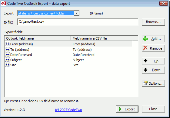
Screenshot of CodeTwo Outlook Export
Language: English
Publisher: CodeTwo
License: Freeware
Price: USD $0.00
Filesize: 1.0 MB
Date Added: 07/16/2008

CodeTwo Outlook Export is an easy-to-use free tool for quick and advanced export of data from Microsoft Outlook to CSV text files. The program allows exporting much more data than offered by the built-in export feature in Outlook, allowing the export of non-standard user-defined fields from Outlook and is quicker and easier to use. Data can be exported from folders of all types, such as: Contacts, Calendar, E-mail, Post, Tasks, Journal, Notes.

After installing the program, the new icon will appear in the standard Outlook toolbar. Clicking it runs CodeTwo Outlook Export.

In the CodeTwo Outlook Export window a user can choose whether to export data from all items in the current folder or to export only the selected items. Then the user defines the path to the CSV file to store the exported data.

After clicking the Add button the Field chooser dialog will be displayed. It allows you to add fields of data exported to the CSV file to the Exported fields list. The Field chooser dialog box displays a variety of fields, depending on the folder type, from which the data is currently exported.

In order to add exported fields to the Exported fields list, you need to select them in the Field chooser dialog box and click the Insert button. You can select more than one field at a time. The Field chooser initially displays standard Outlook data fields only. To display user-defined fields, created in a folder or in the other objects, click the Refresh button. If after selecting the Refresh command, a user-defined data field does not appear in the Available fields list, the name must be entered in the Custom field name field and you need to click Add. The field will then be added to the Available fields list.

Rating: 5 Stars

Platform: Windows 2000, Windows XP, Windows 2003, Windows Vista

Category: Business & Finance / Small Business Tools


Download | Homepage | Screenshot | Report Error

Related Software

Calendar Contact Csv Custom Field
E-mail Export Export Fields Journal
Notes Outlook Post Task
User Defined Field
ContactGenie Exporter Basic Ed - Advanced contact exporter for MS Outlook/Exch 2000-2003 including support for PDLs, GAL, GDG. Support for MS Access, MS Excel and text files. Export standardized CompanyName, FileAs, EmailDisplayAs values. Multi-lingual field name support.
Data Fields Manager for Outlook - Add, Capitalize, Find and Replace, Modify, Rename and Clear Outlook standard and user defined fields. The Ultimate Outlook Contact Fields management tool.
Genius Connect - Turn Outlook or Exchange into a more powerful information management tool through database connectivity.
Lotus Notes Calendar to Outlook - Convert Notes Calendar to Outlook from orphan .nsf file or from the domino server with Kernel for Notes Calendar to Outlook software. Convert and save unlimited Calendar entries to PST or Excel file.
Alive Address Book - A sterling electronic address book. Each entry contains over 50 different fields providing the most comprehensive description of the required contact. If any field is absent, it may be added in the Remarks field. Export/import and synchronization...
Hardware Asset Tracker - Organize computer hardware assets with 18 different fields. Simple interface makes it easy to browse, sort, and print out information on each asset. Other features include custom reports, labels, searching, custom fields, and more.
Public Contact After Reply for Outlook - Public Contact after Reply for Outlook (Public CAR for Outlook) is an addon for Microsoft Outlook, which create automatically Outlook contacts after reply to a received E-Mail. This function is supported in Outlook-Express but not in Outlook
OutShare for Outlook - Share and synchronize Microsoft Outlook Personal Folders (calendar, contacts, journal, mail, tasks and notes) without a server. Access your Outlook data without Outlook via web browser and share your Outlook data with users without Microsoft Outlook.
ContactGenie DataPorter Pers - ContactGenie DataPorter Pro, contact import and distribution tool for MS Outlook 2000/2007 supporting custom forms, command line operation, record selection, and contact update/deletion capabilities. MySQL and XML also supported.
Sync2PST for Outlook - Share and synchronize Microsoft Outlook Personal folders (calendar, contacts, journal, mail, tasks and notes) on multiple PCs without a server. Sync Outlook .pst data file between multiple PCs using USB device or shared network folder (LAN).
 

Copyright © 1995-2008 PCWin Download Center. Home | | Privacy | Link to Us | Submit / Update Software